Table of contents
Original in russian: http://habrahabr.ru/post/245441/
When I became enthusiastic about programming I liked working with files. Actually, the work was mainly to read the inputs and test records. Then I worked with databases and used files less often (except for IniFile sometimes). That is why I was rather interested in serialization.
Today I’ll tell you about how we’ve added serialization to our application, about the difficulties we’ve had and how we’ve overcome them. This material is not new, so it would more likely appeal to beginners. Though, anyone would be able to learn criticize some methods.

The idea of “serialization” was very well presented by gunsmoker in his blog.
I’ve chosen serialization to JSON format. Why JSON? It is readable (I use plug-in for Notepad++), it allows to describe complex data structures and, finally, Rad Studio XE7 supports JSON “out of the box”.
To begin with, let us write a prototype to store some object:
As a result, we will have the following object:
Next, we serialize the list of figures TmsShape. To do it, we add a new class with a field named “list”:
We add creating of container to the code of saving and add two objects to it. We also change the parameter of marshaling call (the difference between marshaling and serialization is described in the article of GunSmoker):
The rest of the code remains the same.
As a result, we've got the following file:
As we can see, the file contains too much unnecessary information. This occurs due to the peculiarities of realization of processing the objects for marshaling in the standard library of Json for XE7. The point is that 8 standard converters are described for this in the standard library:
In more detail the work with converters is described here.
In brief, there are 8 functions that can process standard data structures. However, nothing prevents us from overriding these functions (they can be anonymous).
Let us try?
As a result, we’ve got an optimal in a way version:
That’s already quite good. But let’s suppose we have to save a string but not a number. It means we use attributes.
The result is as follows:
The whole code of the module:
It’s time to add serialization to our application.
I’ll remind you how the application looks like:

And also UML-diagram:
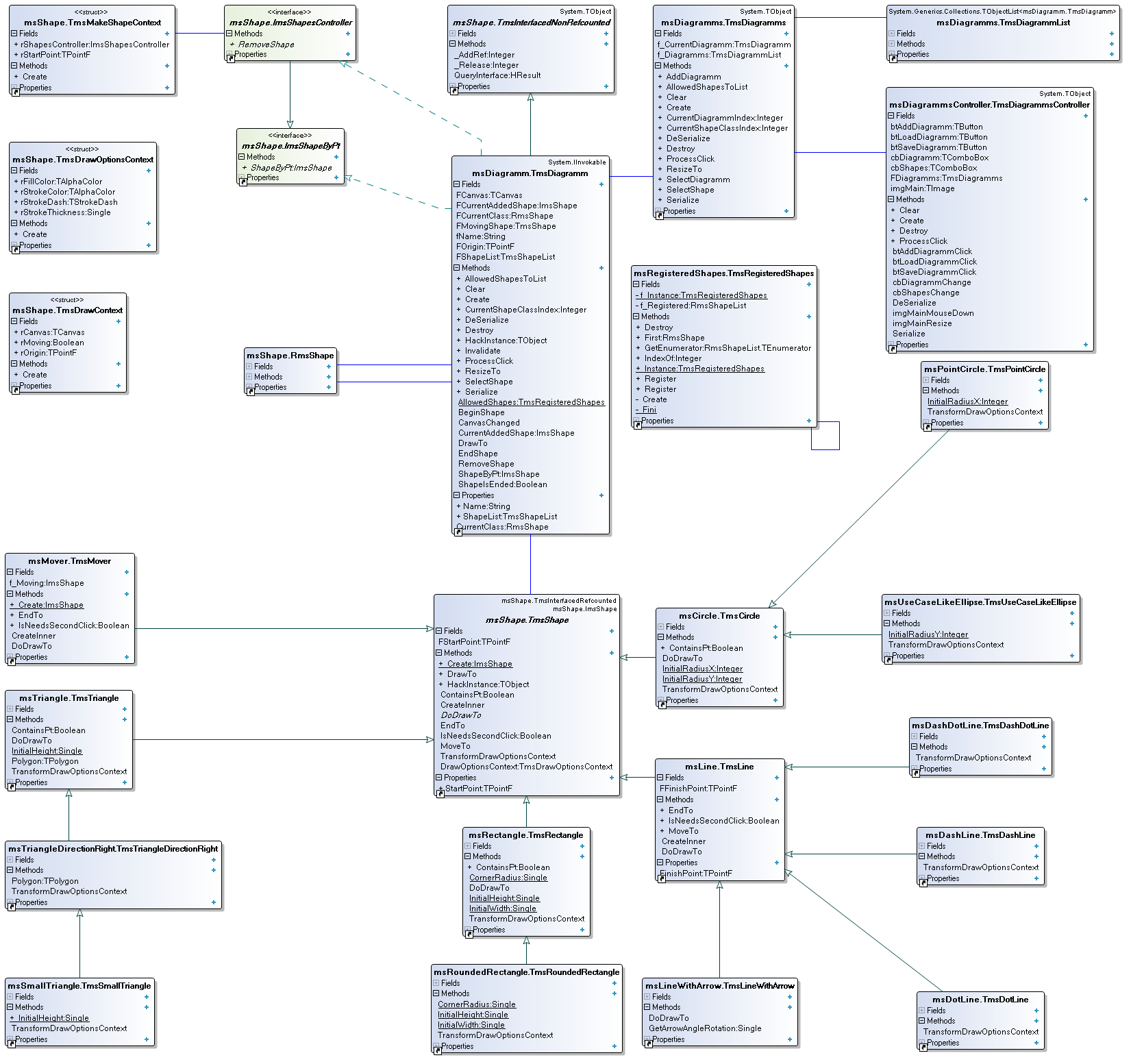
We have to serialize TmsDiagramm class. Not all of it – we need only the figures list on the diagram and the name of the diagram.
We’ll add a class of serialization with 2 static functions:
The function of serialization is the same as given above. Yet, instead of the file the result was an “exception”:
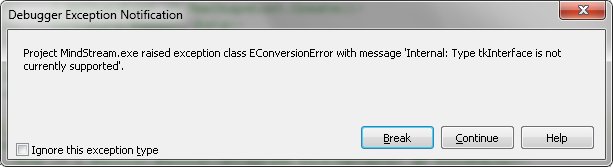
Debugger pleased me with limiting of library functions:
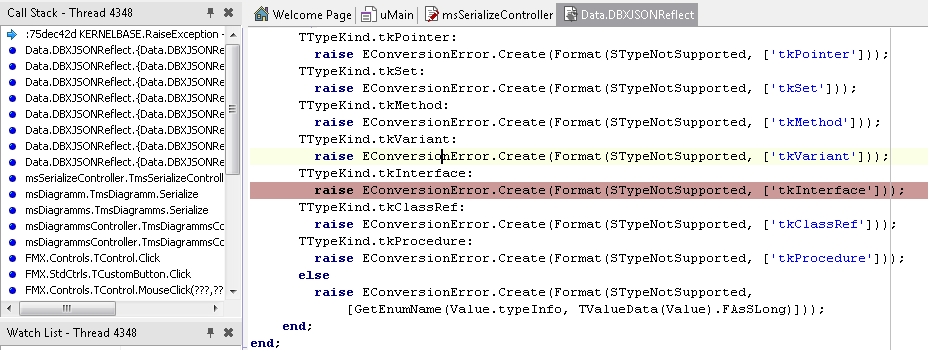
The point is that our list is:
That is a list of interfaces which Json does not support “out of the box”. It’s unfortunate, but we have to do something.
Since we deal with the interface list and the objects in it are real, why shouldn’t we just serialize the list of the objects?
No sooner said than done.
The general idea is to run through the list and save each object
And so I presented my decision to the project manager. Well?
To cut it short, I’ve been put in my place – for independent action. I actually knew myself that deserialization is now “domesticated” in a way. This is not appropriate.
The manager recommended to add HackInstance method to each object; the method will later get a responsible name ToObject:
By creating an app ensuring that controller of serialization processes the objects correctly, we get the following module:
Let’s see what we’ve got.
In Json it will look as follows:
It is time to finish. However, in the previous post I’ve described how we’ve configured the infrastructure of testing for our project. That is why we’ll write the tests. Fans of TDD will dishonor me and fairly. Pardon me, gurus, I am only studying. For testing we’ll just save one object (a figure) and compare it to the original (the one I’ve typed myself).
In general:
Links I’ve used:
www.webdelphi.ru/2011/10/rabota-s-json-v-delphi-2010-xe2/#parsejson
edn.embarcadero.com/article/40882
www.sdn.nl/SDN/Artikelen/tabid/58/view/View/ArticleID/3230/Reading-and-Writing-JSON-with-Delphi.aspx
codereview.stackexchange.com/questions/8850/is-marshalling-converters-reverters-via-polymorphism-realistic
Json viewer plugin for Notepad++
My senior colleague, Alexander, stepped greatly forward in developing compared to my article. The link to the repository. Please, leave all your commentaries to the code in BitBucket, luckily, the repository is open. Those who wish to try themselves in OpenSource – write in PM.
That is how the diagram of the project looks like now:
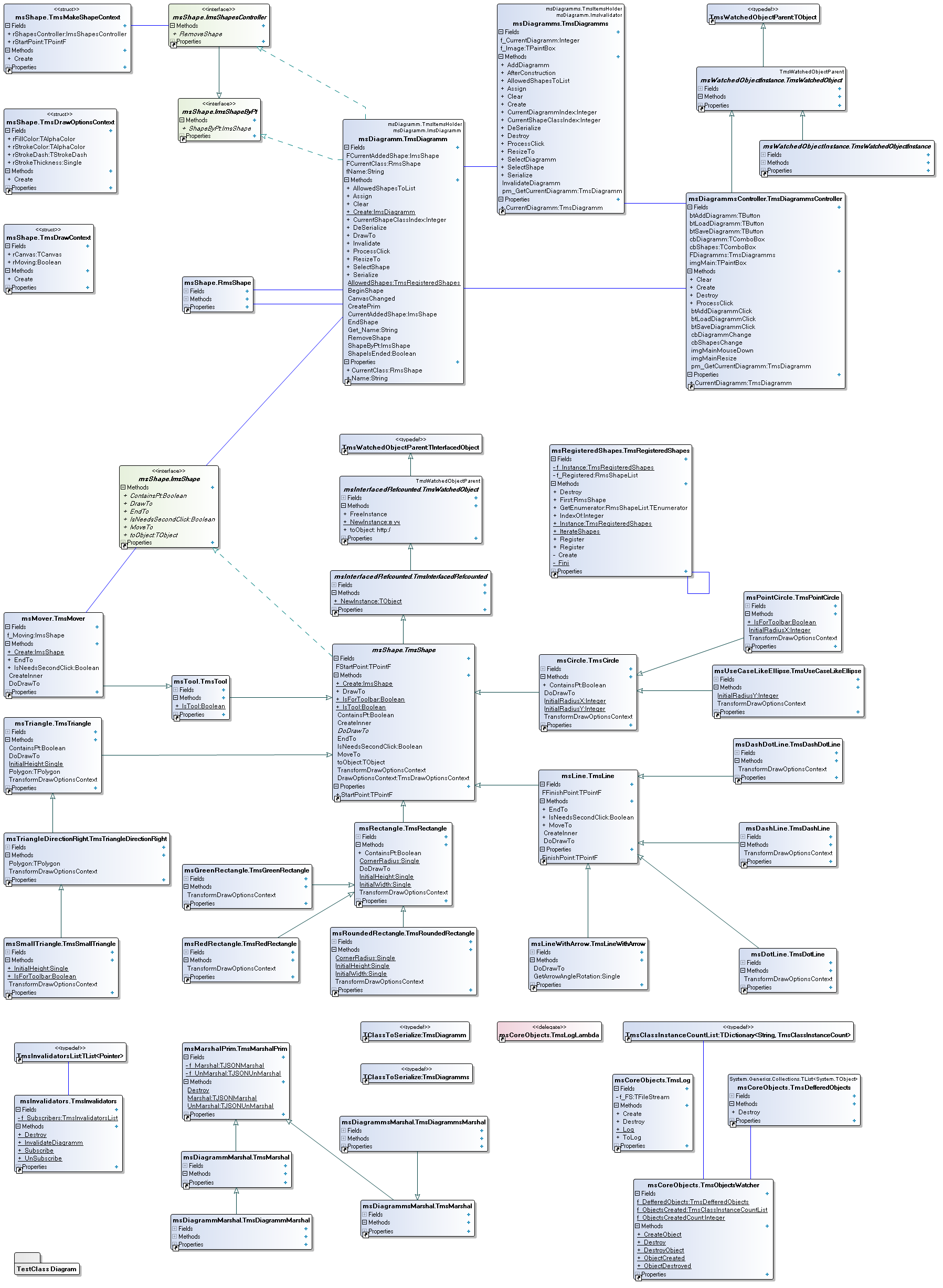
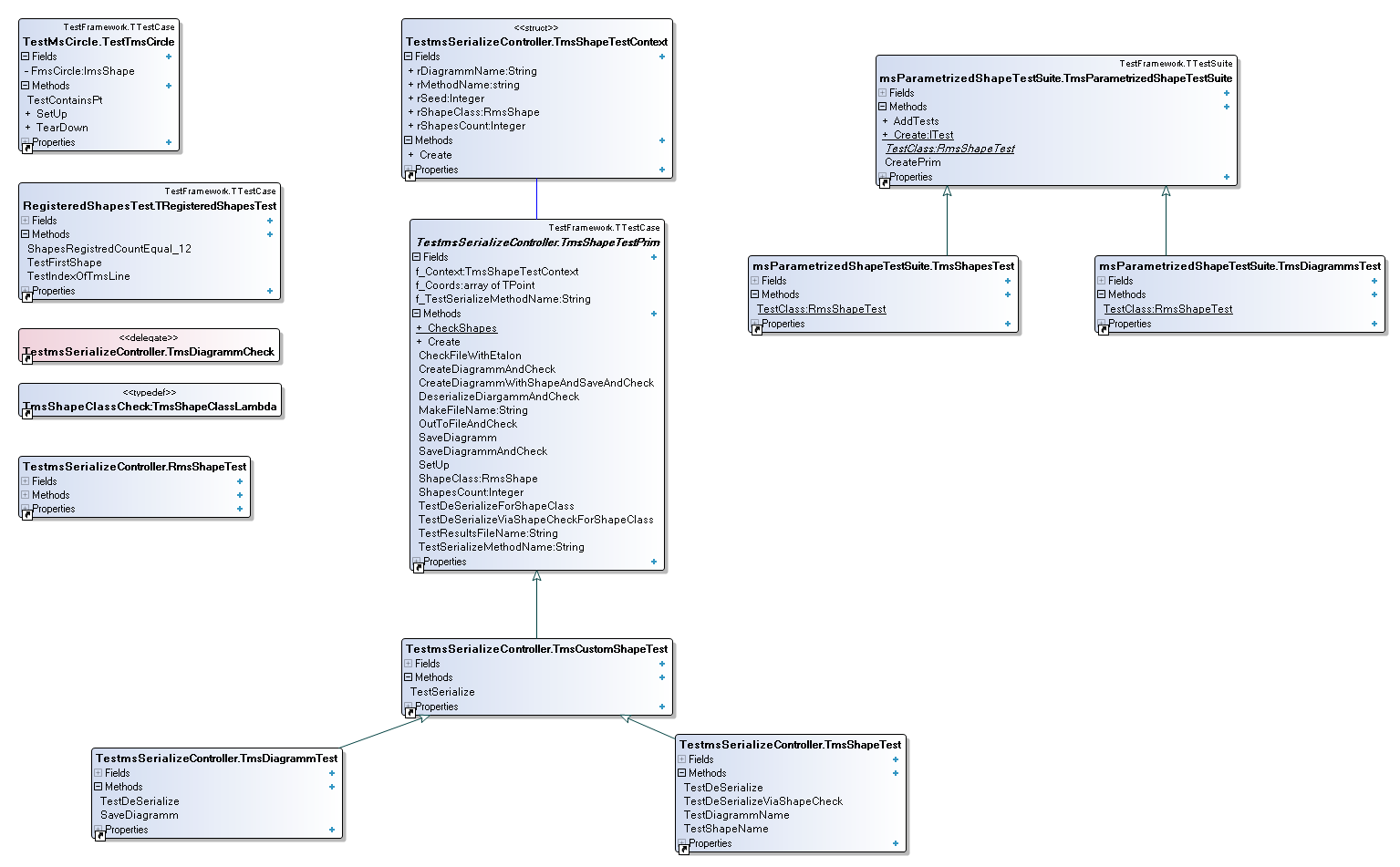
The diagram of the tests:
I’ve chosen serialization to JSON format. Why JSON? It is readable (I use plug-in for Notepad++), it allows to describe complex data structures and, finally, Rad Studio XE7 supports JSON “out of the box”.
To begin with, let us write a prototype to store some object:
...
type
  TmsShape = class
  private
    fInt: integer;
    fStr: String;
  public
    constructor Create(const aInt: integer; const aStr: String);
  end;

constructor TmsShape.Create(const aInt: integer; const aStr: String);
begin
  inherited
  fInt := aInt;
  fStr := aStr;
end;

procedure TForm2.btSaveJsonClick(Sender: TObject);
var
  l_Marshal: TJSONMarshal;
  l_Json: TJSONObject;

  l_Shape1: TmsShape;
  l_StringList: TStringList;
begin
  try
    l_Shape1 := TmsShape.Create(1, 'First');
    l_Marshal := TJSONMarshal.Create;
    l_StringList := TStringList.Create;

    l_Json := l_Marshal.Marshal(l_Shape1) as TJSONObject;
    Memo1.Lines.Text := l_Json.tostring;

    l_StringList.Add(l_Json.tostring);
    l_StringList.SaveToFile(с_FileNameSave);
  finally
    FreeAndNil(l_Marshal);
    FreeAndNil(l_StringList);
    FreeAndNil(l_Json);
    FreeAndNil(l_Shape1);
  end;
end;
As a result, we will have the following object:
{
    "type": "uMain.TmsShape",
    "id": 1,
    "fields": {
        "fInt": 1,
        "fStr": "First"
    }
}
Next, we serialize the list of figures TmsShape. To do it, we add a new class with a field named “list”:
...
type
  TmsShapeContainer = class
  private
    fList: TList<tmsshape>;
  public
    constructor Create;
    destructor Destroy;
  end;

constructor TmsShapeContainer.Create;
begin
  inherited;
  fList := TList<tmsshape>.Create;
end;

destructor TmsShapeContainer.Destroy;
begin
  FreeAndNil(fList);
  inherited;
end;
We add creating of container to the code of saving and add two objects to it. We also change the parameter of marshaling call (the difference between marshaling and serialization is described in the article of GunSmoker):
…
    l_msShapeContainer := TmsShapeContainer.Create;
    l_msShapeContainer.fList.Add(l_Shape1);
    l_msShapeContainer.fList.Add(l_Shape2);
…
    l_Json := l_Marshal.Marshal(l_msShapeContainer) as TJSONObject;
...
The rest of the code remains the same.
As a result, we've got the following file:
{
    "type": "uMain.TmsShapeContainer",
    "id": 1,
    "fields": {
        "fList": {
            "type": "System.Generics.Collections.TList<umain .tmsshape="">",
            "id": 2,
            "fields": {
                "FItems": [{
                    "type": "uMain.TmsShape",
                    "id": 3,
                    "fields": {
                        "fInt": 1,
                        "fStr": "First"
                    }
                },
                {
                    "type": "uMain.TmsShape",
                    "id": 4,
                    "fields": {
                        "fInt": 2,
                        "fStr": "Second"
                    }
                }],
                "FCount": 2,
                "FArrayManager": {
                    "type": "System.Generics.Collections.TMoveArrayManager<umain .tmsshape="">",
                    "id": 5,
                    "fields": {

                    }
                }
            }
        }
    }
}
As we can see, the file contains too much unnecessary information. This occurs due to the peculiarities of realization of processing the objects for marshaling in the standard library of Json for XE7. The point is that 8 standard converters are described for this in the standard library:
  //Convert a field in an object array
  TObjectsConverter = reference to function(Data: TObject; Field: String): TListOfObjects;
  //Convert a field in a strings array
  TStringsConverter = reference to function(Data: TObject; Field: string): TListOfStrings;

  //Convert a type in an objects array
  TTypeObjectsConverter = reference to function(Data: TObject): TListOfObjects;
  //Convert a type in a strings array
  TTypeStringsConverter = reference to function(Data: TObject): TListOfStrings;

  //Convert a field in an object
  TObjectConverter = reference to function(Data: TObject; Field: String): TObject;
  //Convert a field in a string
  TStringConverter = reference to function(Data: TObject; Field: string): string;

  //Convert specified type in an object
  TTypeObjectConverter = reference to function(Data: TObject): TObject;
  //Convert specified type in a string
  TTypeStringConverter = reference to function(Data: TObject): string;
In more detail the work with converters is described here.
In brief, there are 8 functions that can process standard data structures. However, nothing prevents us from overriding these functions (they can be anonymous).
Let us try?
…
    l_Marshal.RegisterConverter(TmsShapeContainer, 'fList',
      function(Data: TObject; Field: string): TListOfObjects
      var l_Shape : TmsShape;
          l_Index: integer;
      begin
        SetLength(Result, (Data As TmsShapeContainer).fList.Count);
        l_Index := 0;
        for l_Shape in (Data As TmsShapeContainer).fList do
        begin
          Result[l_Index] := l_Shape;
          Inc(l_Index);
        end;
      end
      );
...
As a result, we’ve got an optimal in a way version:
{
    "type": "uMain.TmsShapeContainer",
    "id": 1,
    "fields": {
        "fList": [{
            "type": "uMain.TmsShape",
            "id": 2,
            "fields": {
                "fInt": 1,
                "fStr": "First"
            }
        },
        {
            "type": "uMain.TmsShape",
            "id": 3,
            "fields": {
                "fInt": 2,
                "fStr": "Second"
            }
        }]
    }
}
That’s already quite good. But let’s suppose we have to save a string but not a number. It means we use attributes.
type
  TmsShape = class
  private
  [JSONMarshalled(False)]
    fInt: integer;
  [JSONMarshalled(True)]
    fStr: String;
  public
    constructor Create(const aInt: integer; const aStr: String);
  end;
The result is as follows:
{
    "type": "uMain.TmsShapeContainer",
    "id": 1,
    "fields": {
        "fList": [{
            "type": "uMain.TmsShape",
            "id": 2,
            "fields": {
                "fStr": "First"
            }
        },
        {
            "type": "uMain.TmsShape",
            "id": 3,
            "fields": {
                "fStr": "Second"
            }
        }]
    }
}
The whole code of the module:
unit uMain;

interface

uses
  System.SysUtils,
  System.Types,
  System.UITypes,
  System.Classes,
  System.Variants,
  FMX.Types,
  FMX.Controls,
  FMX.Forms,
  FMX.Graphics,
  FMX.Dialogs,
  FMX.StdCtrls,
  FMX.Layouts,
  FMX.Memo,
  Generics.Collections,
  Data.DBXJSONReflect
  ;

type
  TForm2 = class(TForm)
    SaveDialog1: TSaveDialog;
    Memo1: TMemo;
    btSaveJson: TButton;
    btSaveEMB_Example: TButton;
    procedure btSaveJsonClick(Sender: TObject);
    procedure btSaveEMB_ExampleClick(Sender: TObject);
  private
    { Private declarations }
  public
    { Public declarations }
  end;

type
  TmsShape = class
  private
  [JSONMarshalled(False)]
    fInt: integer;
  [JSONMarshalled(True)]
    fStr: String;
  public
    constructor Create(const aInt: integer; const aStr: String);
  end;

  TmsShapeContainer = class
  private
    fList: TList<tmsshape>;
  public
    constructor Create;
    destructor Destroy;
  end;

var
  Form2: TForm2;

implementation

uses
  json,
  uFromEmbarcadero;

const
  с_FileNameSave = 'D:\TestingJson.ms';
{$R *.fmx}
  { TmsShape }

constructor TmsShape.Create(const aInt: integer; const aStr: String);
begin
  fInt := aInt;
  fStr := aStr;
end;

procedure TForm2.btSaveEMB_ExampleClick(Sender: TObject);
begin
  Memo1.Lines.Assign(mainproc);
end;

procedure TForm2.btSaveJsonClick(Sender: TObject);
var
  l_Marshal: TJSONMarshal;
  l_Json: TJSONObject;

  l_Shape1, l_Shape2: TmsShape;
  l_msShapeContainer: TmsShapeContainer;
  l_StringList: TStringList;
begin
  try
    l_Shape1 := TmsShape.Create(1, 'First');
    l_Shape2 := TmsShape.Create(2, 'Second');

    l_msShapeContainer := TmsShapeContainer.Create;
    l_msShapeContainer.fList.Add(l_Shape1);
    l_msShapeContainer.fList.Add(l_Shape2);

    l_Marshal := TJSONMarshal.Create;
    l_StringList := TStringList.Create;

    l_Marshal.RegisterConverter(TmsShapeContainer, 'fList',
      function(Data: TObject; Field: string): TListOfObjects
      var l_Shape : TmsShape;
          l_Index: integer;
      begin
        SetLength(Result, (Data As TmsShapeContainer).fList.Count);
        l_Index := 0;
        for l_Shape in (Data As TmsShapeContainer).fList do
        begin
          Result[l_Index] := l_Shape;
          Inc(l_Index);
        end;
      end
      );

    l_Json := l_Marshal.Marshal(l_msShapeContainer) as TJSONObject;
    Memo1.Lines.Text := l_Json.tostring;

    l_StringList.Add(l_Json.tostring);
    l_StringList.SaveToFile(с_FileNameSave);
  finally
    FreeAndNil(l_Marshal);
    FreeAndNil(l_StringList);
    FreeAndNil(l_Json);
    FreeAndNil(l_Shape1);
    FreeAndNil(l_Shape2);
    FreeAndNil(l_msShapeContainer);
  end;
end;

{ TmsShapeContainer }

constructor TmsShapeContainer.Create;
begin
  inherited;
  fList := TList<tmsshape>.Create;
end;

destructor TmsShapeContainer.Destroy;
begin
  FreeAndNil(fList);
  inherited;
end;

end.
It’s time to add serialization to our application.
I’ll remind you how the application looks like:
And also UML-diagram:
We have to serialize TmsDiagramm class. Not all of it – we need only the figures list on the diagram and the name of the diagram.
...
type
 TmsShapeList = class(TList<imsshape>)
 public
  function ShapeByPt(const aPoint: TPointF): ImsShape;
 end; // TmsShapeList

 TmsDiagramm = class(TmsInterfacedNonRefcounted, ImsShapeByPt, ImsShapesController, IInvokable)
 private
  [JSONMarshalled(True)]
  FShapeList: TmsShapeList;
  [JSONMarshalled(False)]
  FCurrentClass: RmsShape;
  [JSONMarshalled(False)]
  FCurrentAddedShape: ImsShape;
  [JSONMarshalled(False)]
  FMovingShape: TmsShape;
  [JSONMarshalled(False)]
  FCanvas: TCanvas;
  [JSONMarshalled(False)]
  FOrigin: TPointF;
  f_Name: String;
...
We’ll add a class of serialization with 2 static functions:
type
 TmsSerializeController = class(TObject)
 public
  class procedure Serialize(const aFileName: string; const aDiagramm: TmsDiagramm);
  class function DeSerialize(const aFileName: string): TmsDiagramm;
 end; // TmsDiagrammsController
The function of serialization is the same as given above. Yet, instead of the file the result was an “exception”:
Debugger pleased me with limiting of library functions:
The point is that our list is:
type
 TmsShapeList = class(TList<imsshape>)
 public
  function ShapeByPt(const aPoint: TPointF): ImsShape;
 end; // TmsShapeList
That is a list of interfaces which Json does not support “out of the box”. It’s unfortunate, but we have to do something.
Since we deal with the interface list and the objects in it are real, why shouldn’t we just serialize the list of the objects?
No sooner said than done.
var
 l_SaveDialog: TSaveDialog;
 l_Marshal: TJSONMarshal; // Serializer

 l_Json: TJSONObject;
 l_JsonArray: TJSONArray;
 l_StringList: TStringList;
 l_msShape: ImsShape;
begin
 l_SaveDialog := TSaveDialog.Create(nil);
 if l_SaveDialog.Execute then
 begin
  try
   l_Marshal := TJSONMarshal.Create;

   l_StringList := TStringList.Create;
   l_JsonArray := TJSONArray.Create;
   for l_msShape in FShapeList do
   begin
    l_Json := l_Marshal.Marshal(TObject(l_msShape)) as TJSONObject;
    l_JsonArray.Add(l_Json);
   end;
   l_Json := TJSONObject.Create(TJSONPair.Create('MindStream', l_JsonArray));
   l_StringList.Add(l_Json.tostring);
   l_StringList.SaveToFile(l_SaveDialog.FileName);
  finally
   FreeAndNil(l_Json);
   FreeAndNil(l_StringList);
   FreeAndNil(l_Marshal);
  end;

 end
 else
  assert(false);

 FreeAndNil(l_SaveDialog);
end;
The general idea is to run through the list and save each object
And so I presented my decision to the project manager. Well?
To cut it short, I’ve been put in my place – for independent action. I actually knew myself that deserialization is now “domesticated” in a way. This is not appropriate.
The manager recommended to add HackInstance method to each object; the method will later get a responsible name ToObject:
function TmsShape.HackInstance : TObject;
begin
 Result := Self;
end;
By creating an app ensuring that controller of serialization processes the objects correctly, we get the following module:
unit msSerializeController;

interface

uses
  JSON,
  msDiagramm,
  Data.DBXJSONReflect;

type
  TmsSerializeController = class(TObject)
  public
    class procedure Serialize(const aFileName: string;
      const aDiagramm: TmsDiagramm);
    class function DeSerialize(const aFileName: string): TmsDiagramm;
  end; // TmsDiagrammsController

implementation

uses
  System.Classes,
  msShape,
  FMX.Dialogs,
  System.SysUtils;

{ TmsSerializeController }

class function TmsSerializeController.DeSerialize(const aFileName: string)
  : TmsDiagramm;
var
  l_UnMarshal: TJSONUnMarshal;
  l_StringList: TStringList;
begin
  try
    l_UnMarshal := TJSONUnMarshal.Create;

    l_UnMarshal.RegisterReverter(TmsDiagramm, 'FShapeList',
      procedure(Data: TObject; Field: String; Args: TListOfObjects)
      var
        l_Object: TObject;
        l_Diagramm: TmsDiagramm;
        l_msShape: TmsShape;
      begin
        l_Diagramm := TmsDiagramm(Data);
        l_Diagramm.ShapeList := TmsShapeList.Create;
        assert(l_Diagramm <> nil);

        for l_Object in Args do
        begin
          l_msShape := l_Object as TmsShape;
          l_Diagramm.ShapeList.Add(l_msShape);
        end
      end);

    l_StringList := TStringList.Create;
    l_StringList.LoadFromFile(aFileName);

    Result := l_UnMarshal.Unmarshal
      (TJSONObject.ParseJSONValue(l_StringList.Text)) as TmsDiagramm;

  finally
    FreeAndNil(l_UnMarshal);
    FreeAndNil(l_StringList);
  end;
end;

class procedure TmsSerializeController.Serialize(const aFileName: string;
const aDiagramm: TmsDiagramm);
var
  l_Marshal: TJSONMarshal; // Serializer
  l_Json: TJSONObject;
  l_StringList: TStringList;
begin
  try
    l_Marshal := TJSONMarshal.Create;

    l_Marshal.RegisterConverter(TmsDiagramm, 'FShapeList',
      function(Data: TObject; Field: string): TListOfObjects
      var
        l_Shape: ImsShape;
        l_Index: Integer;
      begin
        assert(Field = 'FShapeList');
        SetLength(Result, (Data As TmsDiagramm).ShapeList.Count);
        l_Index := 0;
        for l_Shape in (Data As TmsDiagramm).ShapeList do
        begin
          Result[l_Index] := l_Shape.HackInstance;
          Inc(l_Index);
        end; // for l_Shape
      end);

    l_StringList := TStringList.Create;
    try
      l_Json := l_Marshal.Marshal(aDiagramm) as TJSONObject;
    except
      on E: Exception do
        ShowMessage(E.ClassName + ' поднята ошибка с сообщением : ' +
          E.Message);
    end;

    l_StringList.Add(l_Json.tostring);
    l_StringList.SaveToFile(aFileName);
  finally
    FreeAndNil(l_Json);
    FreeAndNil(l_StringList);
    FreeAndNil(l_Marshal);
  end;
end;

end.
Let’s see what we’ve got.
In Json it will look as follows:
{
    "type": "msDiagramm.TmsDiagramm",
    "id": 1,
    "fields": {
        "FShapeList": [{
            "type": "msCircle.TmsCircle",
            "id": 2,
            "fields": {
                "FStartPoint": [[146,
                250],
                146,
                250],
                "FRefCount": 1
            }
        },
        {
            "type": "msCircle.TmsCircle",
            "id": 3,
            "fields": {
                "FStartPoint": [[75,
                252],
                75,
                252],
                "FRefCount": 1
            }
        },
        {
            "type": "msRoundedRectangle.TmsRoundedRectangle",
            "id": 4,
            "fields": {
                "FStartPoint": [[82,
                299],
                82,
                299],
                "FRefCount": 1
            }
        },
        {
            "type": "msRoundedRectangle.TmsRoundedRectangle",
            "id": 5,
            "fields": {
                "FStartPoint": [[215,
                225],
                215,
                225],
                "FRefCount": 1
            }
        },
        {
            "type": "msRoundedRectangle.TmsRoundedRectangle",
            "id": 6,
            "fields": {
                "FStartPoint": [[322,
                181],
                322,
                181],
                "FRefCount": 1
            }
        },
        {
            "type": "msUseCaseLikeEllipse.TmsUseCaseLikeEllipse",
            "id": 7,
            "fields": {
                "FStartPoint": [[259,
                185],
                259,
                185],
                "FRefCount": 1
            }
        },
        {
            "type": "msTriangle.TmsTriangle",
            "id": 8,
            "fields": {
                "FStartPoint": [[364,
                126],
                364,
                126],
                "FRefCount": 1
            }
        }],
        "fName": "Диаграмма №1"
    }
}
It is time to finish. However, in the previous post I’ve described how we’ve configured the infrastructure of testing for our project. That is why we’ll write the tests. Fans of TDD will dishonor me and fairly. Pardon me, gurus, I am only studying. For testing we’ll just save one object (a figure) and compare it to the original (the one I’ve typed myself).
In general:
unit TestmsSerializeController;
{

  Delphi DUnit Test Case
  ----------------------
  This unit contains a skeleton test case class generated by the Test Case Wizard.
  Modify the generated code to correctly setup and call the methods from the unit
  being tested.

}

interface

uses
  TestFramework,
  msSerializeController,
  Data.DBXJSONReflect,
  JSON,
  FMX.Objects,
  msDiagramm
  ;

type
  // Test methods for class TmsSerializeController

  TestTmsSerializeController = class(TTestCase)
  strict private
    FmsDiagramm: TmsDiagramm;
    FImage: TImage;
  public
    procedure SetUp; override;
    procedure TearDown; override;
  published
    procedure TestSerialize;
    procedure TestDeSerialize;
  end;

implementation

 uses
  System.SysUtils,
  msTriangle,
  msShape,
  System.Types,
  System.Classes
  ;

 const
  c_DiagramName = 'First Diagram';
  c_FileNameTest = 'SerializeTest.json';
  c_FileNameEtalon = 'SerializeEtalon.json';

procedure TestTmsSerializeController.SetUp;
begin
 FImage:= TImage.Create(nil);
 FmsDiagramm := TmsDiagramm.Create(FImage, c_DiagramName);
end;

procedure TestTmsSerializeController.TearDown;
begin
 FreeAndNil(FImage);
 FreeAndNil(FmsDiagramm);
end;

procedure TestTmsSerializeController.TestSerialize;
var
  l_FileSerialized, l_FileEtalon: TStringList;
begin
 FmsDiagramm.ShapeList.Add(TmsTriangle.Create(TmsMakeShapeContext.Create(TPointF.Create(10, 10),nil)));
  // TODO: Setup method call parameters
 TmsSerializeController.Serialize(c_FileNameTest, FmsDiagramm);
  // TODO: Validate method results
 l_FileSerialized := TStringList.Create;
 l_FileSerialized.LoadFromFile(c_FileNameTest);

 l_FileEtalon := TStringList.Create;
 l_FileEtalon.LoadFromFile(c_FileNameEtalon);

 CheckTrue(l_FileEtalon.Equals(l_FileSerialized));

 FreeAndNil(l_FileSerialized);
 FreeAndNil(l_FileEtalon);
end;

procedure TestTmsSerializeController.TestDeSerialize;
var
  ReturnValue: TmsDiagramm;
  aFileName: string;
begin
  // TODO: Setup method call parameters
  ReturnValue := TmsSerializeController.DeSerialize(aFileName);
  // TODO: Validate method results
end;

initialization
  // Register any test cases with the test runner
  RegisterTest(TestTmsSerializeController.Suite);
end.
Links I’ve used:
www.webdelphi.ru/2011/10/rabota-s-json-v-delphi-2010-xe2/#parsejson
edn.embarcadero.com/article/40882
www.sdn.nl/SDN/Artikelen/tabid/58/view/View/ArticleID/3230/Reading-and-Writing-JSON-with-Delphi.aspx
codereview.stackexchange.com/questions/8850/is-marshalling-converters-reverters-via-polymorphism-realistic
Json viewer plugin for Notepad++
My senior colleague, Alexander, stepped greatly forward in developing compared to my article. The link to the repository. Please, leave all your commentaries to the code in BitBucket, luckily, the repository is open. Those who wish to try themselves in OpenSource – write in PM.
That is how the diagram of the project looks like now:
The diagram of the tests:

Комментариев нет:
Отправить комментарий