Original post in Russian -
http://habrahabr.ru/post/232955/
Table of contents
A month ago we decided to write a cross-platform application using FireMonkey. As a direction we chose drawing the graphics primitives with a possibility of saving and data restoring.
The process of writing the application was agreed to be described in details on this blog.
The articles will disclose practical use of various techniques such as Dependency Injection, the factory method, contexts, controllers and so on. The plan for the nearest future is to widen this set with DUnit tests. At the moment DUnit does not exist for FMX, so we will have to come up with our own ideas.
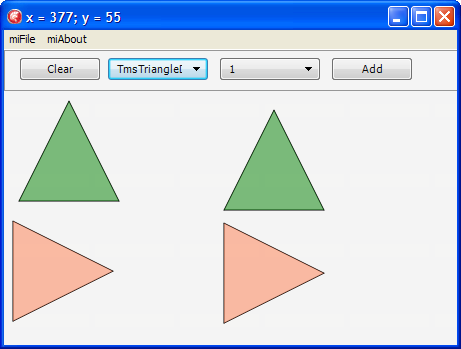
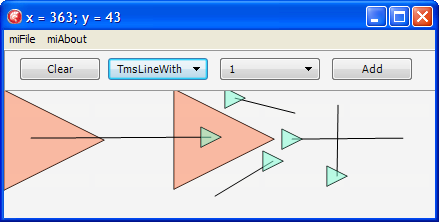
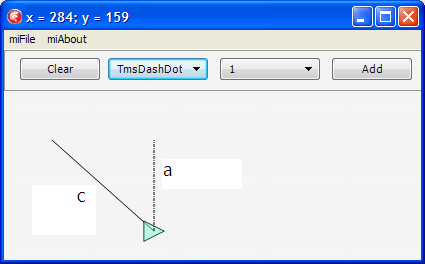
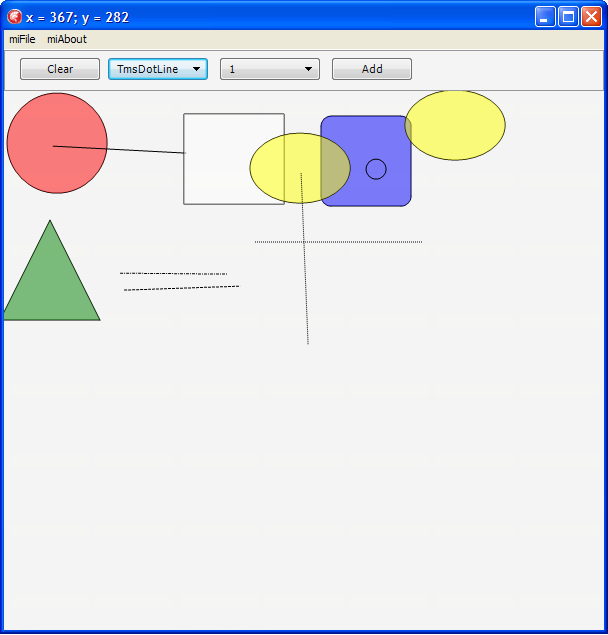
We’ll start with a working prototype that by the moment of ending the article will look like this:

To begin with, we will have to create an app that draws on Canvas. The first primitives that will be added to the program are a rectangle and a line.For that we place TImage object on a form and also add creating the Bitmap method:
procedure TfmMain.FormCreate(Sender: TObject);
begin
imgMain.Bitmap := TBitmap.Create(400, 400);
imgMain.Bitmap.Clear(TAlphaColorRec.White);
end;
The procedure of drawing the rectangle:
procedure TfmMain.btnRectClick(Sender: TObject);
begin
imgMain.Bitmap.Canvas.BeginScene;
imgMain.Bitmap.Canvas.DrawRect(TRectF.Create(10, 10, 200, 270),
30, 60,
AllCorners, 100,
TCornerType.ctRound);
imgMain.Bitmap.Canvas.EndScene;
end;
For the line it is even simpler:
ImgMain.Bitmap.Canvas.BeginScene;
ImgMain.Bitmap.Canvas.DrawLine(FStartPos, TPointF.Create(X, Y), 1);
ImgMain.Bitmap.Canvas.EndScene;
Next we define a class for TMyShape figures, from which our figures TLine and TRectangle are inherited:
type
TMyShape = class
private
FStartPoint, FFinalPoint: TPointF;
public
Constructor Create(aStartPoint, aFinalPoint: TPointF); overload;
procedure DrawTo(aCanvas : TCanvas);
procedure DrawShape(aCanvas : TCanvas); virtual; abstract;
end;
TLine = class(TMyShape)
private
procedure DrawShape(aCanvas : TCanvas); override;
end;
TRectangle = class(TMyShape)
private
procedure DrawShape(aCanvas : TCanvas); override;
end;
procedure TMyShape.DrawTo(aCanvas: TCanvas);
begin
aCanvas.BeginScene;
DrawShape(aCanvas);
aCanvas.EndScene;
end;
As we can see, DrawTo method accounts for preparing a canvas for drawing and calls a virtual method for drawing each figure.
Let us create TDrawness class intended for storing of all the figures and drawing of them.
type
TDrawness = class
private
FShapeList : TObjectList;
function GetShapeList: TObjectList;
public
constructor Create;
destructor Destroy; override;
procedure DrawTo(aCanvas : TCanvas);
property ShapeList : TObjectList read GetShapeList;
end;
The DrawTo procedure looks throughout the list and calls an appropriate method for each object:
procedure TDrawness.DrawTo(aCanvas: TCanvas);
var
i : Integer;
begin
for i:= 0 to FShapeList.Count-1
do FShapeList[i].DrawTo(aCanvas);
end;
In other words, each figure that we want to memorize has to be added to Drawness. For example, the code of creating a rectangle becomes this like:
procedure TfmMain.btnRectClick(Sender: TObject);
var
l_StartPoint, l_FinalPoint: TPointF;
begin
l_StartPoint := TPointF.Create(StrToFloat(edtStartPointX.Text),
StrToFloat(edtStartPointY.Text));
l_FinalPoint := TPointF.Create(StrToFloat(edtFinalPointX.Text),
StrToFloat(edtFinalPointY.Text));
FDrawness.ShapeList.Add(TRectangle.Create(l_StartPoint, l_FinalPoint));
FDrawness.ShapeList.Last.DrawTo(imgMain.Bitmap.Canvas);
end;
The last line in the method is necessary in order to draw the figure we’ve added just before.
To draw lines we add a small circle that will be drawn at the starting and the ending points of the line:
type
TmsPointCircle= class(TMyShape)
private
procedure DrawShape(const aCanvas : TCanvas); override;
end;
procedure TmsPointCircle.DrawShape(const aCanvas: TCanvas);
var
l_StartPoint, l_FinalPoint: TPointF;
begin
l_StartPoint.X := FStartPoint.X - 15;
l_StartPoint.Y := FStartPoint.Y - 15;
l_FinalPoint.X := FStartPoint.X + 15;
l_FinalPoint.Y := FStartPoint.Y + 15;
aCanvas.DrawEllipse(TRectF.Create(l_StartPoint, l_FinalPoint), 1);
end;
Next we develop an app to add lines only on the second click of the mouse, meanwhile we do straight:
procedure TfmMain.imgMainMouseDown(Sender: TObject; Button: TMouseButton;
Shift: TShiftState; X, Y: Single);
begin
FPressed := True;
FStartPos := TPointF.Create(X, Y);
if FIsFirstClick then
FIsFirstClick := False
else
begin
FDrawness.ShapeList.Add(TLine.Create(FStartPos, FLastPoint));
FDrawness.ShapeList.Last.DrawTo(imgMain.Bitmap.Canvas);
FIsFirstClick := True;
end;
FLastPoint := TPointF.Create(X, Y);
FDrawness.ShapeList.Add(TmsPointCircle.Create(FStartPos, FLastPoint));
FDrawness.ShapeList.Last.DrawTo(imgMain.Bitmap.Canvas);
end;
Let us make a small refactoring and add AddPrimitive method to TDrawness method:
procedure TmsDrawness.AddPrimitive(const aShape: TmsShape);
begin
FShapeList.Add(aShape);
end;
And here we’ll use Dependency Injection. We create container to store types of all our figures. For that we use the list of TmsShape metaclass. The container we make using Singleton, because we need the list of the types of our figures as singleton, and we add AddPrimitive method there.
unit msRegisteredPrimitives;
interface
uses
msShape, Generics.Collections;
type
RmsShape = class of TmsShape;
TmsRegistered = TList;
TmsRegisteredPrimitives = class
strict private
FmsRegistered : TmsRegistered;
class var FInstance: TmsRegisteredPrimitives;
constructor Create;
public
class function GetInstance: TmsRegisteredPrimitives;
procedure AddPrimitive(const Value : RmsShape);
end;
implementation
procedure TmsRegisteredPrimitives.AddPrimitive(const Value: RmsShape);
begin
FmsRegistered.Add(Value);
end;
constructor TmsRegisteredPrimitives.Create;
begin
inherited;
end;
class function TmsRegisteredPrimitives.GetInstance: TmsRegisteredPrimitives;
begin
If FInstance = nil Then
begin
FInstance := TmsRegisteredPrimitives.Create();
end;
Result := FInstance;
end;
end.
A registration of each class inherited from TMsShape will be used as a dependency injection.
initialization
TmsRegisteredPrimitives.GetInstance.AddPrimitive(TmsLine);
TmsRegisteredPrimitives.GetInstance.AddPrimitive(TmsRectangle);
end.
We load (on FormCreate) the list of our primitives in ComboBox so that to call them in more convenient way:
for i := 0 to TmsRegisteredPrimitives.GetInstance.PrimitivesCount-1 do
cbbPrimitives.Items.AddObject(TmsRegisteredPrimitives.GetInstance.Primitives[i].ClassName, TObject(TmsRegisteredPrimitives.GetInstance.Primitives[i]));
Then by means of the simplest operation we can create the primitive we’ve chosen in ComboBox:
FDrawness.AddPrimitive(RmsShape(cbbPrimitives.items.Objects[cbbPrimitives.ItemIndex]).Create(TPointF.Create(X,Y),TPointF.Create(X+100,Y+100)));
We add class method IsNeedsSecondClick to the object TmsShape. This method will be redefined in descendents. True is for the lines, False is for the others.
Let us add to TmsDrawness a new field, which will be responsible for the class chosen in ComboBox:
property CurrentClass : RmsShape read FCurrentClass write FCurrentClass;
In this connection we add the following to ComboBox.OnChange:
FDrawness.CurrentClass := RmsShape(cbbPrimitives.items.Objects[cbbPrimitives.ItemIndex]);
We rewrite adding the figure to Drawness:
ShapeObject := FDrawness.CurrentClass.Create(FStartPos, FLastPoint);
FDrawness.AddPrimitive(ShapeObject);
Since Drawness is responsible for drawing all figures, we add to it the method of Canvas clearing:
procedure TmsDrawness.Clear(const aCanvas: TCanvas);
begin
aCanvas.BeginScene;
aCanvas.Clear(TAlphaColorRec.Null);
aCanvas.EndScene;
end;
And now we rewrite the drawing procedure. Before drawing we will clear Canvas and then draw all the objects from Drawness.List.
procedure TmsDrawness.DrawTo(const aCanvas: TCanvas; const aOrigin : TPointF);
var
i : Integer;
begin
Clear(aCanvas);
for i:= 0 to FShapeList.Count-1
do FShapeList[i].DrawTo(aCanvas, aOrigin);
end;
Since we ensured the work of the prototype, it is time to start refactoring and namely building the architecture of the application.
To begin with, we transfer object creation to TDrawness.AddPrimitive method and stop creating it on the form.
procedure TmsDrawness.AddPrimitive(const aStart: TPointF; const aFinish: TPointF);
begin
Assert(CurrentClass <> nil);
FShapeList.Add(CurrentClass.Create(aStart, aFinish));
end;
Next, we change the algorithm of creating and adding the new figure. Instead of direct adding the primitive to the list, let us introduce intermediate object like TmsShape. The code of adding the primitive now looks like this:
procedure TmsDrawness.AddPrimitive(const aStart: TPointF; const aFinish: TPointF);
begin
Assert(CurrentClass <> nil);
FCurrentAddedShape := CurrentClass.Create(aStart, aFinish);
FShapeList.Add(FCurrentAddedShape);
end;
Then we check the current class to see whether it needs the second mouse click to draw.
procedure TmsDrawness.AddPrimitive(const aStart: TPointF; const aFinish: TPointF);
begin
Assert(CurrentClass <> nil);
FCurrentAddedShape := CurrentClass.Create(aStart, aFinish);
FShapeList.Add(FCurrentAddedShape);
if not FCurrentAddedShape.IsNeedsSecondClick then
// - if there is no need in SecondClick, then our primitive is finished
FCurrentAddedShape := nil;
end;
At the same time we change adding of primitives on the form:
procedure TfmMain.imgMainMouseDown(Sender: TObject; Button: TMouseButton;
Shift: TShiftState; X, Y: Single);
var
l_StartPoint : TPointF;
begin
l_StartPoint := TPointF.Create(X, Y);
if (FDrawness.CurrentAddedShape = nil) then
// - we HAVE NOT added the primitive – we have to ADD it
FDrawness.AddPrimitive(l_StartPoint, l_StartPoint)
else
FDrawness.FinalizeCurrentShape(l_StartPoint);
FDrawness.DrawTo(imgMain.Bitmap.Canvas, FOrigin);
end;
So, what do we have.
If we need to draw a line, our CurrentAddedShape equals zero on the first click. That is why we added the primitive with the same points of start and end of the section.
Then in FDrawness.AddPrimitive we check the current class. Since (in case of a line) it needs the second click we do nothing.
After that we redraw all objects. At this moment nothing can be drawn, because a line with the same starting and ending points simply can not be drawn.
When a user clicks the mouse for the second time, we check again CurrentAddedShape, and since we didn’t release it we call the method of figure finalization, where we locate the second point of the line, and we release our buffer object:
procedure TmsDrawness.FinalizeCurrentShape(const aFinish: TPointF);
begin
Assert(CurrentAddedShape <> nil);
CurrentAddedShape.FinalPoint := aFinish;
FCurrentAddedShape := nil;
end;
And again we redraw all figures.
For the rest of the figures in FDrawness.AddPrimitive after adding the figure to the list we release our “buffer” at once.
After a little refactoring (we rename our methods more responsibly and transfer processing of the mouse click to Drawness) we get the following situation:
procedure TmsDiagramm.ProcessClick(const aStart: TPointF);
begin
if ShapeIsEnded then
// - we HAVE NOT added the primitive – we have to ADD it
BeginShape(aStart)
else
EndShape(aStart);
end;
function TmsDiagramm.ShapeIsEnded: Boolean;
begin
Result := (CurrentAddedShape = nil);
end;
procedure TmsDiagramm.BeginShape(const aStart: TPointF);
begin
Assert(CurrentClass <> nil);
FCurrentAddedShape := CurrentClass.Create(aStart, aStart);
FShapeList.Add(FCurrentAddedShape);
if not FCurrentAddedShape.IsNeedsSecondClick then
// - if there is no need in SecondClick, then our primitive is finished
FCurrentAddedShape := nil;
Invalidate;
end;
procedure TmsDiagramm.EndShape(const aFinish: TPointF);
begin
Assert(CurrentAddedShape <> nil);
CurrentAddedShape.EndTo(aFinish);
FCurrentAddedShape := nil;
Invalidate;
end;
procedure TmsDiagramm.Invalidate;
begin
Clear;
DrawTo(FCanvas, FOrigin);
end;
Since TDrawness is already in fact a controller of drawing, its purpose is to prepare Canvas to the drawing, at the same time we use the enumerator:
procedure TmsDrawness.DrawTo(const aCanvas: TCanvas; const aOrigin : TPointF);
var
l_Shape : TmsShape;
begin
aCanvas.BeginScene;
try
for l_Shape in FShapeList do
l_Shape.DrawTo(aCanvas, aOrigin);
finally
aCanvas.EndScene;
end;//try..finally
end;
While drawing the line we draw the circle in place of the first click:
procedure TmsLine.DrawTo(const aCanvas : TCanvas; const aOrigin : TPointF);
var
l_Proxy : TmsShape;
begin
if (StartPoint = FinishPoint) then
begin
l_Proxy := TmsPointCircle.Create(StartPoint, StartPoint);
try
l_Proxy.DrawTo(aCanvas, aOrigin);
finally
FreeAndNil(l_Proxy);
end;//try..finally
end//StartPoint = FinishPoint
else
aCanvas.DrawLine(StartPoint.Add(aOrigin),
FinishPoint.Add(aOrigin), 1);
end;
As you can see, we create and draw a small circle, but we do not add it to the list of the primitives in Drawness, so on the second mouse click our canvas will be redrawn, and there will be no circle.
We add a new figure – a circle:
type
TmsCircle = class(TmsShape)
protected
procedure DrawShape(const aCanvas : TCanvas; const aOrigin : TPointF); override;
public
class function IsNeedsSecondClick : Boolean; override;
end;
implementation
const
c_CircleRadius = 50;
{ TmsCircle }
procedure TmsCircle.DrawShape(const aCanvas: TCanvas; const aOrigin : TPointF);
var
l_StartPoint, l_FinalPoint: TPointF;
begin
l_StartPoint.X := FStartPoint.X - c_CircleRadius;
l_StartPoint.Y := FStartPoint.Y - c_CircleRadius;
l_FinalPoint.X := FStartPoint.X + c_CircleRadius;
l_FinalPoint.Y := FStartPoint.Y + c_CircleRadius;
aCanvas.DrawEllipse(TRectF.Create(l_StartPoint.Add(aOrigin),
l_FinalPoint.Add(aOrigin)), 1);
end;
class function TmsCircle.IsNeedsSecondClick: Boolean;
begin
Result := False;
end;
end.
In the class of the circle we replace the constant by the call of a virtual method:
class function TmsCircle.Radius: Integer;
begin
Result := 50;
end;
As a result, in the class for the small circle we have only to redefine Radius method:
type
TmsPointCircle = class(TmsCircle)
protected
class function Radius: Integer; override;
end;
implementation
{ TmsPointCircle }
class function TmsPointCircle.Radius: Integer;
begin
Result := 10;
end;
end.
We complete our Dependency Injection, transfer class registration from the container to each class and add a new method Register to TmsShape. We also declare it as abstract.
Class TmsShape now looks like this:
type
TmsShape = class abstract (TObject)
private
FStartPoint: TPointF;
FFinishPoint: TPointF;
protected
property StartPoint : TPointF read FStartPoint;
property FinishPoint : TPointF read FFinishPoint;
class procedure Register;
public
constructor Create(const aStartPoint, aFinishPoint: TPointF); virtual;
procedure DrawTo(const aCanvas : TCanvas; const aOrigin : TPointF); virtual; abstract;
class function IsNeedsSecondClick : Boolean; virtual;
procedure EndTo(const aFinishPoint: TPointF);
end;
implementation
uses
msRegisteredPrimitives
;
class procedure TmsShape.Register;
begin
TmsRegisteredPrimitives.Instance.AddPrimitive(Self);
end;
constructor TmsShape.Create(const aStartPoint, aFinishPoint: TPointF);
begin
FStartPoint := aStartPoint;
FFinishPoint := aFinishPoint;
end;
procedure TmsShape.EndTo(const aFinishPoint: TPointF);
begin
FFinishPoint := aFinishPoint;
end;
class function TmsShape.IsNeedsSecondClick : Boolean;
begin
Result := false;
end;
end.
A line about class registration has now emerged in each class, for example in TmsRectangle class:
initialization
TmsRectangle.Register;
As a next primitive we add a rectangle with rounded edges:
type
TmsRoundedRectangle = class(TmsRectangle)
protected
procedure DrawTo(const aCanvas : TCanvas; const aOrigin : TPointF); override;
end;//TmsRoundedRectangle
implementation
procedure TmsRoundedRectangle.DrawTo(const aCanvas: TCanvas; const aOrigin : TPointF);
begin
aCanvas.DrawRect(TRectF.Create(StartPoint.Add(aOrigin),
FinishPoint.Add(aOrigin)),
10, 10,
AllCorners, 1,
TCornerType.ctRound);
end;
initialization
TmsRoundedRectangle.Register;
end.
That is all! Thanks to the registration of the form in the container, this is the whole code we need.
Once more.
We have to inherit a class from any figure and redefine the drawing method (if needed). Since TmsShape is a superclass, the class that is registered in the container will be added directly in the class method Register.
Than we have all classes from the container filling ComboBox on FormCreate.
And when we choose specific figure, the written mechanisms will work.
Then, due to inheritance and virtual functions we make drawing a new figure easier. In TmsRectangle class we introduce class method CornerRadius and change drawing, at the same time disposing of magic numbers.
class function TmsRectangle.CornerRadius: Single;
begin
Result := 0;
end;
procedure TmsRectangle.DrawTo(const aCanvas: TCanvas; const aOrigin : TPointF);
begin
aCanvas.DrawRect(TRectF.Create(StartPoint.Add(aOrigin),
FinishPoint.Add(aOrigin)),
CornerRadius,
CornerRadius,
AllCorners,
1,
TCornerType.ctRound);
end;
Now it is enough to just rewrite CornerRadius method in our new class with the required value of rounding the angles. In whole the class looks like this:
type
TmsRoundedRectangle = class(TmsRectangle)
protected
class function CornerRadius: Single; override;
end;//TmsRoundedRectangle
implementation
class function TmsRoundedRectangle.CornerRadius: Single;
begin
Result := 10;
end;
initialization
TmsRoundedRectangle.Register;
end.
Using the similar way we dispose of the constants. We also add color filling. Let us try to fill a rectangle:
procedure TmsRectangle.DrawTo(const aCanvas: TCanvas; const aOrigin : TPointF);
begin
aCanvas.Fill.Color := TAlphaColorRec.White;
aCanvas.DrawRect(TRectF.Create(StartPoint.Add(aOrigin),
FinishPoint.Add(aOrigin)),
CornerRadius,
CornerRadius,
AllCorners,
1,
TCornerType.ctRound);
aCanvas.FillRect(TRectF.Create(StartPoint.Add(aOrigin),
FinishPoint.Add(aOrigin)),
CornerRadius,
CornerRadius,
AllCorners,
1,
TCornerType.ctRound);
end;
As we can see, in order to fill the figure we have to define the filling color for the canvas. So as not to duplicate the code and not to add a new parameter to drawing method, we use virtual method FillColor for TmsShape. We also rewrite the method of drawing in the superclass.
We will first define all the necessary parameters for the canvas, and only after that we will call the virtual method of drawing each figure:
procedure TmsShape.DrawTo(const aCanvas : TCanvas; const aOrigin : TPointF);
begin
aCanvas.Fill.Color := FillColor;
DoDrawTo(aCanvas, aOrigin);
end;
To add the next primitive we add virtual functions for the circle:
type
TmsCircle = class(TmsShape)
protected
class function InitialRadiusX: Integer; virtual;
class function InitialRadiusY: Integer; virtual;
function FillColor: TAlphaColor; override;
procedure DoDrawTo(const aCanvas : TCanvas; const aOrigin : TPointF); override;
public
constructor Create(const aStartPoint, aFinishPoint: TPointF); override;
end;
The next primitive we make is a yellow oval:
type
TmsUseCaseLikeEllipse = class(TmsCircle)
protected
class function InitialRadiusY: Integer; override;
function FillColor: TAlphaColor; override;
end;//TmsUseCaseLikeEllipse
implementation
class function TmsUseCaseLikeEllipse.InitialRadiusY: Integer;
begin
Result := 35;
end;
function TmsUseCaseLikeEllipse.FillColor: TAlphaColor;
begin
Result := TAlphaColorRec.Yellow;
end;
initialization
TmsUseCaseLikeEllipse.Register;
end.
We add the new primitive – a triangle:
type
TmsTriangle = class(TmsShape)
protected
function FillColor: TAlphaColor; override;
procedure DoDrawTo(const aCanvas : TCanvas; const aOrigin : TPointF); override;
end;//TmsTriangle
implementation
uses
System.Math.Vectors
;
function TmsTriangle.FillColor: TAlphaColor;
begin
 Result := TAlphaColorRec.Green;
end;
procedure TmsTriangle.DoDrawTo(const aCanvas: TCanvas; const aOrigin : TPointF);
const
cHeight = 100;
var
l_P : TPolygon;
begin
SetLength(l_P, 4);
l_P[0] := TPointF.Create(StartPoint.X - cHeight div 2,
StartPoint.Y + cHeight div 2);
l_P[1] := TPointF.Create(StartPoint.X + cHeight div 2,
StartPoint.Y + cHeight div 2);
l_P[2] := TPointF.Create(StartPoint.X,
StartPoint.Y - cHeight div 2);
l_P[3] := l_P[0];
aCanvas.DrawPolygon(l_P, 1);
aCanvas.FillPolygon(l_P, 0.5);
end;
initialization
TmsTriangle.Register;
end.
As we can see, drawing the triangle differs in some way from other figures. Anyway, it is really simple. The type TPolygon is a dynamic massive of TPointF. We fill it due to the simple calculation, at the same time the last point of the polygon should be its first point. And the drawing is organized through standard methods.
Let us bring order to the classes names. We rename TmsDrawness class to TmsDiagramm. Besides, including that all operations with Canvas are performed by class Diagramm, we make Canvas a part of Diagramm.
We dispose of the “unnecessary knowledge” in the form and transfer it to class Diagram, in that way we choose a full controller, that is responsible for creating and drawing all figures of our application.
type
 TmsDiagramm = class(TObject)
 private
  FShapeList : TmsShapeList;
  FCurrentClass : RmsShape;
  FCurrentAddedShape : TmsShape;
  FCanvas : TCanvas;
  FOrigin : TPointF;
 private
  procedure DrawTo(const aCanvas : TCanvas; const aOrigin : TPointF);
  function CurrentAddedShape: TmsShape;
  procedure BeginShape(const aStart: TPointF);
  procedure EndShape(const aFinish: TPointF);
  function ShapeIsEnded: Boolean;
  class function AllowedShapes: RmsShapeList;
  procedure CanvasChanged(aCanvas: TCanvas);
 public
  constructor Create(anImage: TImage);
  procedure ResizeTo(anImage: TImage);
  destructor Destroy; override;
  procedure ProcessClick(const aStart: TPointF);
  procedure Clear;
  property CurrentClass : RmsShape read FCurrentClass write FCurrentClass;
  procedure Invalidate;
  procedure AllowedShapesToList(aList: TStrings);
  procedure SelectShape(aList: TStrings; anIndex: Integer);
 end;

implementation

uses
 msRegisteredPrimitives
 ;

class function TmsDiagramm.AllowedShapes: RmsShapeList;
begin
 Result := TmsRegisteredPrimitives.Instance.Primitives;
end;

procedure TmsDiagramm.AllowedShapesToList(aList: TStrings);
var
 l_Class : RmsShape;
begin
 for l_Class in AllowedShapes do
  aList.AddObject(l_Class.ClassName, TObject(l_Class));
end;

procedure TmsDiagramm.SelectShape(aList: TStrings; anIndex: Integer);
begin
 CurrentClass := RmsShape(aList.Objects[anIndex]);
end;

procedure TmsDiagramm.ProcessClick(const aStart: TPointF);
begin
 if ShapeIsEnded then
 // - we HAVE NOT added the primitive – we have to ADD it
  BeginShape(aStart)
 else
  EndShape(aStart);
end;

procedure TmsDiagramm.BeginShape(const aStart: TPointF);
begin
 Assert(CurrentClass <> nil);
 FCurrentAddedShape := CurrentClass.Create(aStart, aStart);
 FShapeList.Add(FCurrentAddedShape);
 if not FCurrentAddedShape.IsNeedsSecondClick then
 // - if there is no need in SecondClick, then our primitive is finished
  FCurrentAddedShape := nil;
 Invalidate;
end;

procedure TmsDiagramm.Clear;
begin
 FCanvas.BeginScene;
 try
  FCanvas.Clear(TAlphaColorRec.Null);
 finally
  FCanvas.EndScene;
 end;//try..finally
end;

constructor TmsDiagramm.Create(anImage: TImage);
begin
 FShapeList := TmsShapeList.Create;
 FCurrentAddedShape := nil;
 FCanvas := nil;
 FOrigin := TPointF.Create(0, 0);
 ResizeTo(anImage);
 FCurrentClass := AllowedShapes.First;
end;

procedure TmsDiagramm.ResizeTo(anImage: TImage);
begin
 anImage.Bitmap := TBitmap.Create(Round(anImage.Width), Round(anImage.Height));
 CanvasChanged(anImage.Bitmap.Canvas);
end;

procedure TmsDiagramm.CanvasChanged(aCanvas: TCanvas);
begin
 FCanvas := aCanvas;
 Invalidate;
end;

function TmsDiagramm.CurrentAddedShape: TmsShape;
begin
 Result := FCurrentAddedShape;
end;

destructor TmsDiagramm.Destroy;
begin
 FreeAndNil(FShapeList);
 inherited;
end;

procedure TmsDiagramm.DrawTo(const aCanvas: TCanvas; const aOrigin : TPointF);
var
 l_Shape : TmsShape;
begin
 aCanvas.BeginScene;
 try
  for l_Shape in FShapeList do
   l_Shape.DrawTo(aCanvas, aOrigin);
 finally
  aCanvas.EndScene;
 end;//try..finally
end;

procedure TmsDiagramm.EndShape(const aFinish: TPointF);
begin
 Assert(CurrentAddedShape <> nil);
 CurrentAddedShape.EndTo(aFinish);
 FCurrentAddedShape := nil;
 Invalidate;
end;

procedure TmsDiagramm.Invalidate;
begin
 Clear;
 DrawTo(FCanvas, FOrigin);
end;

function TmsDiagramm.ShapeIsEnded: Boolean;
begin
 Result := (CurrentAddedShape = nil);
end;

end.
The code of the form now looks like this:
var
 fmMain: TfmMain;

implementation

{$R *.fmx}

procedure TfmMain.btnClearImageClick(Sender: TObject);
begin
 FDiagramm.Clear;
end;

procedure TfmMain.btnDrawAllClick(Sender: TObject);
begin
 FDiagramm.Invalidate;
end;

procedure TfmMain.cbbPrimitivesChange(Sender: TObject);
begin
 FDiagramm.SelectShape(cbbPrimitives.Items, cbbPrimitives.ItemIndex);
end;

procedure TfmMain.FormCreate(Sender: TObject);
begin
 FDiagramm := TmsDiagramm.Create(imgMain);
 FDiagramm.AllowedShapesToList(cbbPrimitives.Items);
end;

procedure TfmMain.FormDestroy(Sender: TObject);
begin
 FreeAndNil(FDiagramm);
end;

procedure TfmMain.imgMainMouseMove(Sender: TObject; Shift: TShiftState; X,
  Y: Single);
begin
 Caption := 'x = ' + FloatToStr(X) + '; y = ' + FloatToStr(Y);
end;

procedure TfmMain.imgMainResize(Sender: TObject);
begin
 FDiagramm.ResizeTo(imgMain);
end;

procedure TfmMain.imgMainMouseDown(Sender: TObject; Button: TMouseButton;
  Shift: TShiftState; X, Y: Single);
begin
 FDiagramm.ProcessClick(TPointF.Create(X, Y));
end;

procedure TfmMain.miAboutClick(Sender: TObject);
begin
 ShowMessage(self.Caption);
end;

procedure TfmMain.miExitClick(Sender: TObject);
begin
 self.Close;
end;

end.
As we can see, the whole code we had initially written in the event handler is now completely hidden in the controller TmsDiagram.
Next we add the diagrams list, because we want to have the possibility to draw a few diagrams independently:
type
 TmsDiagrammList = TObjectList;

 TmsDiagramms = class(TObject)
 private
  f_Diagramms : TmsDiagrammList;
  f_CurrentDiagramm : TmsDiagramm;
 public
  constructor Create(anImage: TImage; aList: TStrings);
  destructor Destroy; override;
  procedure ProcessClick(const aStart: TPointF);
  procedure Clear;
  procedure SelectShape(aList: TStrings; anIndex: Integer);
  procedure AllowedShapesToList(aList: TStrings);
  procedure ResizeTo(anImage: TImage);
  procedure AddDiagramm(anImage: TImage; aList: TStrings);
  function CurrentDiagrammIndex: Integer;
  procedure SelectDiagramm(anIndex: Integer);
 end;//TmsDiagramms

implementation

uses
 System.SysUtils
 ;

constructor TmsDiagramms.Create(anImage: TImage; aList: TStrings);
begin
 inherited Create;
 f_Diagramms := TmsDiagrammList.Create;
 AddDiagramm(anImage, aList);
end;

procedure TmsDiagramms.AddDiagramm(anImage: TImage; aList: TStrings);
begin
 f_CurrentDiagramm := TmsDiagramm.Create(anImage, IntToStr(f_Diagramms.Count + 1));
 f_Diagramms.Add(f_CurrentDiagramm);
 aList.AddObject(f_CurrentDiagramm.Name, f_CurrentDiagramm);
 //f_CurrentDiagramm.Invalidate;
end;

function TmsDiagramms.CurrentDiagrammIndex: Integer;
begin
 Result := f_Diagramms.IndexOf(f_CurrentDiagramm);
end;

procedure TmsDiagramms.SelectDiagramm(anIndex: Integer);
begin
 if (anIndex < 0) OR (anIndex >= f_Diagramms.Count) then
  Exit;
 f_CurrentDiagramm := f_Diagramms.Items[anIndex];
 f_CurrentDiagramm.Invalidate;
end;

destructor TmsDiagramms.Destroy;
begin
 FreeAndNil(f_Diagramms);
 inherited;
end;

procedure TmsDiagramms.ProcessClick(const aStart: TPointF);
begin
 f_CurrentDiagramm.ProcessClick(aStart);
end;

procedure TmsDiagramms.Clear;
begin
 f_CurrentDiagramm.Clear;
end;

procedure TmsDiagramms.SelectShape(aList: TStrings; anIndex: Integer);
begin
 f_CurrentDiagramm.SelectShape(aList, anIndex);
end;

procedure TmsDiagramms.AllowedShapesToList(aList: TStrings);
begin
 f_CurrentDiagramm.AllowedShapesToList(aList);
end;

procedure TmsDiagramms.ResizeTo(anImage: TImage);
begin
 f_CurrentDiagramm.ResizeTo(anImage);
end;

end.
We can see that the class of the diagrams list represents in fact a cover for each diagram and the details of the work with the list.
Taking into account that each diagram has its own chosen primitive, we add IndexOf method to the container:
function TmsRegisteredShapes.IndexOf(const aValue : RmsShape): Integer;

begin
 Result := f_Registered.IndexOf(aValue);
end;
And now we add the method to the diagram:
function TmsDiagramm.CurrentShapeClassIndex: Integer;
begin
 Result := AllowedShapes.IndexOf(FCurrentClass);
end;
And according to the list of the diagrams:
function TmsDiagramms.CurrentShapeClassIndex: Integer;
begin
 Result := f_CurrentDiagramm.CurrentShapeClassIndex;
end;
However, we still appeal to the diagrams list directly from the form. It is time to get rid of it too. To do it, we create the “true controller of the diagrams”. Namely this class will be responsible for the performance of form controllers and also for event processing:
type
 TmsDiagrammsController = class(TObject)
 private
  imgMain: TImage;
  cbShapes: TComboBox;
  cbDiagramm: TComboBox;
  btAddDiagramm: TButton;
  FDiagramm: TmsDiagramms;
  procedure cbDiagrammChange(Sender: TObject);
  procedure imgMainResize(Sender: TObject);
  procedure cbShapesChange(Sender: TObject);
  procedure btAddDiagrammClick(Sender: TObject);
  procedure imgMainMouseDown(Sender: TObject; Button: TMouseButton;
      Shift: TShiftState; X, Y: Single);
 public
  constructor Create(aImage: TImage; aShapes: TComboBox; aDiagramm: TComboBox; aAddDiagramm: TButton);
  destructor Destroy; override;
  procedure Clear;
  procedure ProcessClick(const aStart: TPointF);
 end;//TmsDiagrammsController

implementation

uses
 System.SysUtils
 ;

constructor TmsDiagrammsController.Create(aImage: TImage; aShapes: TComboBox; aDiagramm: TComboBox; aAddDiagramm: TButton);
begin
 inherited Create;
 imgMain := aImage;
 cbShapes := aShapes;
 cbDiagramm := aDiagramm;
 btAddDiagramm := aAddDiagramm;
 FDiagramm := TmsDiagramms.Create(imgMain, cbDiagramm.Items);
 FDiagramm.AllowedShapesToList(cbShapes.Items);
 cbShapes.ItemIndex := FDiagramm.CurrentShapeClassIndex;
 cbDiagramm.ItemIndex := FDiagramm.CurrentDiagrammIndex;
 cbDiagramm.OnChange := cbDiagrammChange;
 imgMain.OnResize := imgMainResize;
 cbShapes.OnChange := cbShapesChange;
 btAddDiagramm.OnClick := btAddDiagrammClick;
 imgMain.OnMouseDown := imgMainMouseDown;
end;

procedure TmsDiagrammsController.cbDiagrammChange(Sender: TObject);
begin
 FDiagramm.SelectDiagramm(cbDiagramm.ItemIndex);
 cbShapes.ItemIndex := FDiagramm.CurrentShapeClassIndex;
end;

procedure TmsDiagrammsController.imgMainResize(Sender: TObject);
begin
 FDiagramm.ResizeTo(imgMain);
end;

procedure TmsDiagrammsController.cbShapesChange(Sender: TObject);
begin
 FDiagramm.SelectShape(cbShapes.Items, cbShapes.ItemIndex);
end;

procedure TmsDiagrammsController.btAddDiagrammClick(Sender: TObject);
begin
 FDiagramm.AddDiagramm(imgMain, cbDiagramm.Items);
 cbDiagramm.ItemIndex := FDiagramm.CurrentDiagrammIndex;
 cbShapes.ItemIndex := FDiagramm.CurrentShapeClassIndex;
end;

destructor TmsDiagrammsController.Destroy;
begin
 FreeAndNil(FDiagramm);
end;

procedure TmsDiagrammsController.Clear;
begin
 FDiagramm.Clear;
end;

procedure TmsDiagrammsController.ProcessClick(const aStart: TPointF);
begin
 FDiagramm.ProcessClick(aStart);
end;

procedure TmsDiagrammsController.imgMainMouseDown(Sender: TObject;
  Button: TMouseButton; Shift: TShiftState; X, Y: Single);
begin
 Self.ProcessClick(TPointF.Create(X, Y));
end;

end.
Now all we have to do is to create our controller:
procedure TfmMain.FormCreate(Sender: TObject);
begin
 FDiagrammsController := TmsDiagrammsController.Create(imgMain, cbShapes, cbDiagramm, btAddDiagramm);
end;
The picture of the application:
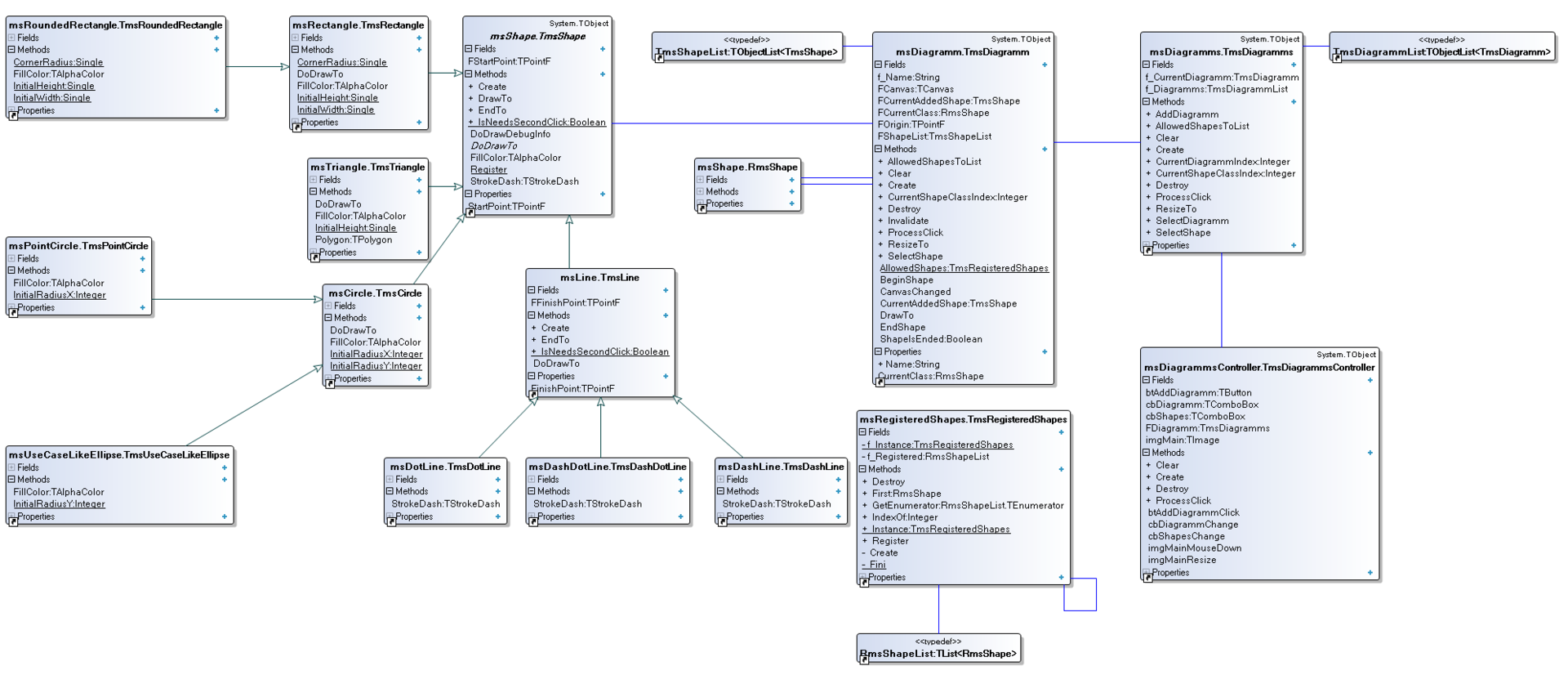
UML class diagram:
So well, in the article we’ve shown how to get rid of code duplication step-by-step by using inheritance and virtual functions. We’ve given an example of Dependency Injection, which made our life greatly easier. Otherwise we would constantly see unarticulated “case of” and “Object is”. We have demonstrated, step by step, how to avoid writing code inside event handler – that is by creating specific class-controller, which takes all the responsibility. We’ve also shown how not to make “Swiss knives” of a class, by dividing each layer according to the responsibilities. TmsDiagramm is responsible for drawing. TmsDiagramms is responsible for the list of diagrams, and besides it accounts for the co-ordination of the whole work of each diagram with the main computer. Finally, the class TmsDiagrammsController is a connecting link between a user and the diagrams.
BitBucket repository