Original post in Russian -http://habrahabr.ru/post/234801/
Table of contents
Good day to you. In this article I will continue to tell how we develop software for FireMonkey. Two interesting objects will be added. Both of them will remind us of vector algebra and trigonometry. The methods from OOP that we use will also be shown in the post. A number of lines (that differ from each other only by dashes, dot-and-dash, point-to-point, etc.) that we added were made in the same way as the description of previous primitives. Now it is time to move on to more complex figures (including compound ones). The first primitive to be added is an arrowed line (as an arrow an ordinary triangle of smaller size will serve). To begin with, let us introduce a triangle “looking” to the right. It means we will inherit the ordinary triangle and rewrite for it Polygon method that is responsible for the coordinates of the vertices.
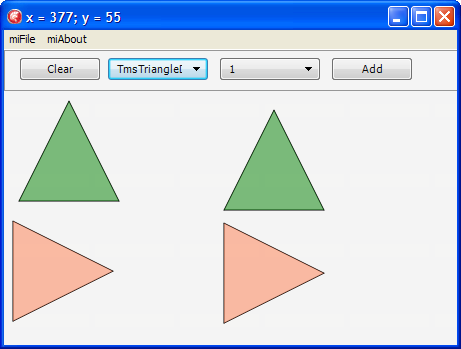
Further, we inherit a so-called “small triangle”:
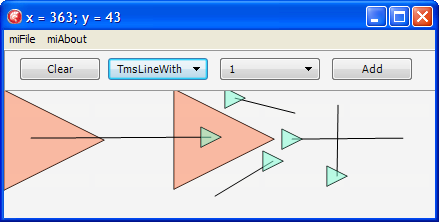
Now the task becomes more interesting. We have to rotate a triangle perpendicular to the line that has drawn it. In order to do this we’ll introduce method GetArrowAngleRotation calculating the rotation angle. Let us imagine that our line is a hypotenuse of a right-angled triangle; then let’s find an angle with a leg of the triangle. By this angle the triangle will rotate around the line:

Next, we’ll add an object responsible for moving of the figures.
We’ll use the following algorithm:
1. We need a method to determine whether a point gets to a specific figure, say ContainsPt, for each figure. Since formulas for calculating the getting are unique for each figure, we’ll use virtual functions.
2. The next method is required to determine which figure the point has got to in case figures cross. Since the figures get on the list as they appear on the form, provided that figures cross, the figure at the beginning of the list is the last to have appeared and is therefore at the top. In fact, there’s a pitfall in this logic, but for now let’s assume it is right and leave the correction for the next post.
3. On the first click in the figure to which we’ve got we have to change its outline or a number of other characteristics.
4. On the second click we have to move the figure to which we’ve got.
The class of the moving will be inherited from a standard figure, but it will store a figure that it moves, and this class is the one to redraw the figure on the second click (I have described the peculiarities of drawing the lines in my previous post).
We implement the methods I’ve described.
1. This method detects whether a point gets to a figure (in our case it is a rectangle):
function TmsRectangle.ContainsPt(const aPoint: TPointF): Boolean;
Let’s ensure that our controller (TmsDiagramm) inherits from TmsInterfacedNonRefcounted and the interfaces. Let us also change one line in BeginShape method. We had the following:


Let’s somewhat make over object registration in the container. Now each class registers itself. Let’s put registration into a separate module.

In this post we’ve tried to show how to make our life easier by using contexts, interfaces and the fabric method. More details on the fabric method you can find here and here. In the next post we will tell how we’ve “tied” DUnit to FireMonkey. We will also develop a number of tests, some of which will cause an error at once.
Source
Table of contents
Good day to you. In this article I will continue to tell how we develop software for FireMonkey. Two interesting objects will be added. Both of them will remind us of vector algebra and trigonometry. The methods from OOP that we use will also be shown in the post. A number of lines (that differ from each other only by dashes, dot-and-dash, point-to-point, etc.) that we added were made in the same way as the description of previous primitives. Now it is time to move on to more complex figures (including compound ones). The first primitive to be added is an arrowed line (as an arrow an ordinary triangle of smaller size will serve). To begin with, let us introduce a triangle “looking” to the right. It means we will inherit the ordinary triangle and rewrite for it Polygon method that is responsible for the coordinates of the vertices.
function TmsTriangleDirectionRight.Polygon: TPolygon;
begin
  SetLength(Result, 4);
  Result[0] := TPointF.Create(StartPoint.X - InitialHeight / 2,
                              StartPoint.Y - InitialHeight / 2);
  Result[1] := TPointF.Create(StartPoint.X - InitialHeight / 2,
                              StartPoint.Y + InitialHeight / 2);
  Result[2] := TPointF.Create(StartPoint.X + InitialHeight / 2,
                              StartPoint.Y);
  Result[3] := Result[0];
end;
That is how our triangles look like:Further, we inherit a so-called “small triangle”:
type
  TmsSmallTriangle = class(TmsTriangleDirectionRight)
  protected
    function FillColor: TAlphaColor; override;
  public
    class function InitialHeight: Single; override;
  end; // TmsSmallTriangle
As you can see, all we have done is overridden functions that are unique for the new triangle.
Next, we’ll add a class of an arrowed line inherited from an ordinary line. Only the procedure of drawing the primitive will be overridden in the class, in other words, the line will be drawn by a base class and the triangle is an heir.
procedure TmsLineWithArrow.DoDrawTo(const aCtx: TmsDrawContext);
var
  l_Proxy : TmsShape;
  l_OriginalMatrix: TMatrix;
  l_Matrix: TMatrix;
  l_Angle : Single;
  l_CenterPoint : TPointF;

  l_TextRect : TRectF;
begin
  inherited;
  if (StartPoint <> FinishPoint) then
  begin
    l_OriginalMatrix := aCtx.rCanvas.Matrix;
    try
    l_Proxy := TmsSmallTriangle.Create(FinishPoint);
      try
        // Just yet in order to experiment we specify rotation by 0 degrees
        // to ensure the triangle is drawn correctly
        l_Angle := DegToRad(0);

        l_CenterPoint := TPointF.Create(FinishPoint.X , FinishPoint.Y);

        // We’ve stored the initial matrix
        l_Matrix := l_OriginalMatrix;
        // We’ve transferred the origin of coordinates in the point where a rotation will be made
        l_Matrix := l_Matrix * TMatrix.CreateTranslation(-l_CenterPoint.X, -l_CenterPoint.Y);
        // The process itself
        l_Matrix := l_Matrix * TMatrix.CreateRotation(l_Angle);
        // We’ve put back the origin of the coordinates
        l_Matrix := l_Matrix * TMatrix.CreateTranslation(l_CenterPoint.X, l_CenterPoint.Y);

        // We are applying our space matrix to the canvas
        aCanvas.SetMatrix(l_Matrix);

        // We’re drawing :)
        l_Proxy.DrawTo(aCanvas, aOrigin);
      finally
        FreeAndNil(l_Proxy);
      end; // try..finally
    finally
      // Since we’ve drawn the required figure we put back the initial matrix to the canvas
      aCanvas.SetMatrix(l_OriginalMatrix);
    end;
  end;//(StartPoint <> FinishPoint)
end;
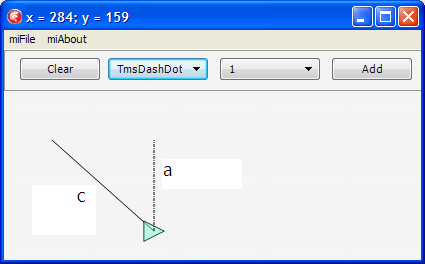
There is nothing much to explain, everything is already given in the commentaries. Anyway, if you wish to recollect what vector algebra is and how to work with vector graphic (moving, figures rotation and so on) I recommend a remarkable post on Habr on this subject as well as articles here and here. As shown in the picture, our triangle is now drawn only if we draw a line from left to right:Now the task becomes more interesting. We have to rotate a triangle perpendicular to the line that has drawn it. In order to do this we’ll introduce method GetArrowAngleRotation calculating the rotation angle. Let us imagine that our line is a hypotenuse of a right-angled triangle; then let’s find an angle with a leg of the triangle. By this angle the triangle will rotate around the line:
function TmsLineWithArrow.GetArrowAngleRotation: Single;
var
  l_ALength, l_CLength, l_AlphaAngle, l_X, l_Y, l_RotationAngle: Single;
  l_PointC: TPointF;
  l_Invert: SmallInt;
begin
  Result := 0;

  // The formula for calculating the distance between two points
  l_X := (FinishPoint.X - StartPoint.X) * (FinishPoint.X - StartPoint.X);
  l_Y := (FinishPoint.Y - StartPoint.Y) * (FinishPoint.Y - StartPoint.Y);

  // We find the length of the hypotenuse of the right-angled triangle
  l_CLength := sqrt(l_X + l_Y);

  l_PointC := TPointF.Create(FinishPoint.X, StartPoint.Y);

  // The formula for calculating the distance between two points
  l_X := (l_PointC.X - StartPoint.X) * (l_PointC.X - StartPoint.X);
  l_Y := (l_PointC.Y - StartPoint.Y) * (l_PointC.Y - StartPoint.Y);

  // We find the length of the leg
  l_ALength := sqrt(l_X + l_Y);

  // The angle in radians
  l_AlphaAngle := ArcSin(l_ALength / l_CLength);

  l_RotationAngle := 0;
  l_Invert := 1;

  if FinishPoint.X > StartPoint.X then
  begin
    l_RotationAngle := Pi / 2 * 3;
    if FinishPoint.Y > StartPoint.Y then
      l_Invert := -1;
  end
  else
  begin
    l_RotationAngle := Pi / 2;
    if FinishPoint.Y < StartPoint.Y then
      l_Invert := -1;
  end;

  Result := l_Invert * (l_AlphaAngle + l_RotationAngle);
end;
Now our line looks like this:Next, we’ll add an object responsible for moving of the figures.
We’ll use the following algorithm:
1. We need a method to determine whether a point gets to a specific figure, say ContainsPt, for each figure. Since formulas for calculating the getting are unique for each figure, we’ll use virtual functions.
2. The next method is required to determine which figure the point has got to in case figures cross. Since the figures get on the list as they appear on the form, provided that figures cross, the figure at the beginning of the list is the last to have appeared and is therefore at the top. In fact, there’s a pitfall in this logic, but for now let’s assume it is right and leave the correction for the next post.
3. On the first click in the figure to which we’ve got we have to change its outline or a number of other characteristics.
4. On the second click we have to move the figure to which we’ve got.
The class of the moving will be inherited from a standard figure, but it will store a figure that it moves, and this class is the one to redraw the figure on the second click (I have described the peculiarities of drawing the lines in my previous post).
We implement the methods I’ve described.
1. This method detects whether a point gets to a figure (in our case it is a rectangle):
function TmsRectangle.ContainsPt(const aPoint: TPointF): Boolean;
var
  l_Finish : TPointF;
  l_Rect: TRectF;
begin
  Result := False;
  l_Finish := TPointF.Create(StartPoint.X + InitialWidth,
                             StartPoint.Y + InitialHeight);
  l_Rect := TRectF.Create(StartPoint,l_Finish);
  Result := l_Rect.Contains(aPoint);
end;
2. This method is used to detect which figure we’ve got to:
class function TmsShape.ShapeByPt(const aPoint: TPointF; aList: TmsShapeList): TmsShape;
var
  l_Shape: TmsShape;
  l_Index: Integer;
begin
  Result := nil;
  for l_Index := aList.Count - 1 downto 0 do
  begin
    l_Shape := aList.Items[l_Index];
    if l_Shape.ContainsPt(aPoint) then
    begin
      Result := l_Shape;
      Exit;
    end; // l_Shape.ContainsPt(aPoint)
  end; // for l_Index
end;
3. On the first click in the figure that we’ve got to we have to change its outline or a number of other characteristics.
To implement this method we’ll perform a slight refactoring. We introduce a so-called “drawing context”:
type
  TmsDrawContext = record
  public
    rCanvas: TCanvas;
    rOrigin: TPointF;
    rMoving: Boolean; // We define that the currently drawn primitive is moving
    constructor Create(const aCanvas: TCanvas; const aOrigin: TPointF);
  end; // TmsDrawContext
If we specify the figure as “movable” in the drawing context, the drawing will be performed in the different way.
procedure TmsShape.DrawTo(const aCtx: TmsDrawContext);
begin
  aCtx.rCanvas.Fill.Color := FillColor;
  if aCtx.rMoving then
  begin
    aCtx.rCanvas.Stroke.Dash := TStrokeDash.sdDashDot;
    aCtx.rCanvas.Stroke.Color := TAlphaColors.Darkmagenta;
    aCtx.rCanvas.Stroke.Thickness := 4;
  end
  else
  begin
    aCtx.rCanvas.Stroke.Dash := StrokeDash;
    aCtx.rCanvas.Stroke.Color := StrokeColor;
    aCtx.rCanvas.Stroke.Thickness := StrokeThickness;
  end;
  DoDrawTo(aCtx);
end;
4. On the second click we have to move the figure to which we’ve got.
To begin with, let’s introduce a factory method responsible for figure constructing (the list of the figures is required so that TmsMover could call all the figures drawn within the current diagram).
class function TmsShape.Make(const aStartPoint: TPointF; aListWithOtherShapes: TmsShapeList): TmsShape;
begin
  Result := Create(aStartPoint);
end;
...
class function TmsMover.Make(const aStartPoint: TPointF;
                                   aListWithOtherShapes: TmsShapeList): TmsShape;
var
  l_Moving: TmsShape;
begin
  l_Moving := ShapeByPt(aStartPoint, aListWithOtherShapes);
  if (l_Moving <> nil) then
    Result := Create(aStartPoint, aListWithOtherShapes, l_Moving)
  else
    Result := nil;
end;
As a result of using class function we’ve fundamentally separated creating of the moved object and of the other figures. However, this approach has a disadvantage. For instance, we introduced a parameter of creating aListWithOtherShapes which is not required for the other figures at all.
type
  TmsMover = class(TmsShape)
  private
    f_Moving: TmsShape;
    f_ListWithOtherShapes: TmsShapeList;
  protected
    procedure DoDrawTo(const aCtx: TmsDrawContext); override;
    constructor Create(const aStartPoint: TPointF; aListWithOtherShapes: TmsShapeList; aMoving: TmsShape);
  public
    class function Make(const aStartPoint: TPointF; aListWithOtherShapes: TmsShapeList): TmsShape; override;
    class function IsNeedsSecondClick: Boolean; override;
    procedure EndTo(const aFinishPoint: TPointF); override;
  end; // TmsMover

implementation

uses
  msRectangle,
  FMX.Types,
  System.SysUtils;

constructor TmsMover.Create(const aStartPoint: TPointF; aListWithOtherShapes: TmsShapeList; aMoving: TmsShape);
begin
  inherited Create(aStartPoint);
  f_ListWithOtherShapes := aListWithOtherShapes;
  f_Moving := aMoving;
end;

class function TmsMover.Make(const aStartPoint: TPointF;
                                   aListWithOtherShapes: TmsShapeList): TmsShape;
var
  l_Moving: TmsShape;
begin
  l_Moving := ShapeByPt(aStartPoint, aListWithOtherShapes);
  if (l_Moving <> nil) then
    Result := Create(aStartPoint, aListWithOtherShapes, l_Moving)
  else
    Result := nil;
end;

class function TmsMover.IsNeedsSecondClick: Boolean;
begin
  Result := true;
end;

procedure TmsMover.EndTo(const aFinishPoint: TPointF);
begin
  if (f_Moving <> nil) then
    f_Moving.MoveTo(aFinishPoint);
  f_ListWithOtherShapes.Remove(Self);
  // Now I must delete MYSELF since we do not need mover in the general list after it has performed its function
end;

procedure TmsMover.DoDrawTo(const aCtx: TmsDrawContext);
var
  l_Ctx: TmsDrawContext;
begin
  if (f_Moving <> nil) then
  begin
    l_Ctx := aCtx;
    l_Ctx.rMoving := true;
    f_Moving.DrawTo(l_Ctx);
  end; // f_Moving <> nil
end;

initialization

TmsMover.Register;

end.
In the controller we just have to change methods of figures creating:
procedure TmsDiagramm.BeginShape(const aStart: TPointF);
begin
  Assert(CurrentClass <> nil);
  FCurrentAddedShape := CurrentClass.Make(aStart, FShapeList);
  if (FCurrentAddedShape <> nil) then
  begin
    FShapeList.Add(FCurrentAddedShape);
    if not FCurrentAddedShape.IsNeedsSecondClick then
      FCurrentAddedShape := nil;
    Invalidate;
  end; // FCurrentAddedShape <> nil
end;

procedure TmsDiagramm.EndShape(const aFinish: TPointF);
begin
  Assert(CurrentAddedShape <> nil);
  CurrentAddedShape.EndTo(aFinish);
  FCurrentAddedShape := nil;
  Invalidate;
end;
In case of mover a call CurrentAddedShape.EndTo(aFinish) calls another one - MoveTo, i.e. moves the figure, and the redrawing, as shown above, is initiated by the controller:
procedure TmsMover.EndTo(const aFinishPoint: TPointF);
begin
  if (f_Moving <> nil) then
    f_Moving.MoveTo(aFinishPoint);
  f_ListWithOtherShapes.Remove(Self);
  // Now I must delete MYSELF since we do not need mover in the general list after it has performed its function
end;

...

procedure TmsShape.MoveTo(const aFinishPoint: TPointF);
begin
  FStartPoint := aFinishPoint;
end;
Since the controller is responsible for figures behavior, we’ll take the method of checking the “getting to a figure” away to the controller, and while creating the objects we’ll pass a check function:
type
  TmsShapeByPt = function (const aPoint: TPointF): TmsShape of object;
...
class function Make(const aStartPoint: TPointF; aShapeByPt: TmsShapeByPt): TmsShape; override;
...
procedure TmsDiagramm.BeginShape(const aStart: TPointF);
begin
 Assert(CurrentClass <> nil);
 // The call itself
 FCurrentAddedShape := CurrentClass.Make(aStart, Self.ShapeByPt);
 if (FCurrentAddedShape <> nil) then
 begin
  FShapeList.Add(FCurrentAddedShape);
  if not FCurrentAddedShape.IsNeedsSecondClick then
   FCurrentAddedShape := nil;
  Invalidate;
 end;//FCurrentAddedShape <> nil
end;
Since we have to pass two parameters in order to create objects, we define a context of “creating”:
type
  TmsMakeShapeContext = record
  public
    rStartPoint: TPointF;
    rShapeByPt: TmsShapeByPt;
    constructor Create(aStartPoint: TPointF; aShapeByPt: TmsShapeByPt);
  end;//TmsMakeShapeContext
Let’s add interfaces implemented by the controller and also a class of interface object. In the future we’ll realise our own reference counting in it.
type
  TmsInterfacedNonRefcounted = class abstract(TObject)
  protected
    function QueryInterface(const IID: TGUID; out Obj): HResult; stdcall;
    function _AddRef: Integer; stdcall;
    function _Release: Integer; stdcall;
  end;//TmsInterfacedNonRefcounted

  TmsShape = class;

  ImsShapeByPt = interface
    function ShapeByPt(const aPoint: TPointF): TmsShape;
  end;//ImsShapeByPt

  ImsShapesController = interface
    procedure RemoveShape(aShape: TmsShape);
  end;//ImsShapeRemover
Let’s slightly change TmsMakeShapeContext:
type
  TmsMakeShapeContext = record
  public
    rStartPoint: TPointF;
    rShapesController: ImsShapesController;
    constructor Create(aStartPoint: TPointF; const aShapesController: ImsShapesController);
  end; // TmsMakeShapeContext
I recommend two interesting posts on interfaces and details of working with them in Delphi: 18delphi.blogspot.com/2013/04/iunknown.html and habrahabr.ru/post/181107/ Let’s ensure that our controller (TmsDiagramm) inherits from TmsInterfacedNonRefcounted and the interfaces. Let us also change one line in BeginShape method. We had the following:
FCurrentAddedShape := CurrentClass.Make(aStart, Self.ShapeByPt);And it became like this:
FCurrentAddedShape := CurrentClass.Make(TmsMakeShapeContext.Create(aStart, Self));In case of moving, EndTo method will look as follows:
procedure TmsMover.EndTo(const aCtx: TmsEndShapeContext);
begin
  if (f_Moving <> nil) then
    f_Moving.MoveTo(aCtx.rStartPoint);
  f_Moving := nil;
  aCtx.rShapesController.RemoveShape(Self);
  // Now I must delete MYSELF
end;
In the previous post I’ve told about hiding of “unique configurations” (filling color, line width, etc.) in virtual methods that each figure defines independently. For example:
function TmsTriangle.FillColor: TAlphaColor;
begin
 Result := TAlphaColorRec.Green;
end;
We pack all figures configurations in the context:
type
  TmsDrawOptionsContext = record
  public
    rFillColor: TAlphaColor;
    rStrokeDash: TStrokeDash;
    rStrokeColor: TAlphaColor;
    rStrokeThickness: Single;
    constructor Create(const aCtx: TmsDrawContext);
  end;//TmsDrawOptionsContext
In TmsShape class we make a virtual procedure similarly to the previous example. In the future we’ll easily expand the number of unique figure configurations:
procedure TmsTriangle.TransformDrawOptionsContext(var theCtx: TmsDrawOptionsContext);
begin
  inherited;
  theCtx.rFillColor := TAlphaColorRec.Green;
  theCtx.rStrokeColor := TAlphaColorRec.Blue;
end;
Using the context we put the logic (do we really draw a mover?) away from the method of drawing and hide it in the record constructor:
constructor TmsDrawOptionsContext.Create(const aCtx: TmsDrawContext);
begin
  rFillColor := TAlphaColorRec.Null;
  if aCtx.rMoving then
  begin
    rStrokeDash := TStrokeDash.sdDashDot;
    rStrokeColor := TAlphaColors.Darkmagenta;
    rStrokeThickness := 4;
  end // aCtx.rMoving
  else
  begin
    rStrokeDash := TStrokeDash.sdSolid;
    rStrokeColor := TAlphaColorRec.Black;
    rStrokeThickness := 1;
  end; // aCtx.rMoving
end;
After that our method of drawing becomes like this:
procedure TmsShape.DrawTo(const aCtx: TmsDrawContext);
var
  l_Ctx: TmsDrawOptionsContext;
begin
  l_Ctx := DrawOptionsContext(aCtx);
  aCtx.rCanvas.Fill.Color := l_Ctx.rFillColor;
  aCtx.rCanvas.Stroke.Dash := l_Ctx.rStrokeDash;
  aCtx.rCanvas.Stroke.Color := l_Ctx.rStrokeColor;
  aCtx.rCanvas.Stroke.Thickness := l_Ctx.rStrokeThickness;
  DoDrawTo(aCtx);
end;

function TmsShape.DrawOptionsContext(const aCtx: TmsDrawContext): TmsDrawOptionsContext;
begin
  Result := TmsDrawOptionsContext.Create(aCtx);
  // We get the configurations for each figure
  TransformDrawOptionsContext(Result);
end;
The only thing left to make our figures movable is to code for each figure ContainsPt method responsible for checking if a point gets to a figure. This is a routine trigonometry; all the formulas can be found on the Internet.
Let’s somewhat make over object registration in the container. Now each class registers itself. Let’s put registration into a separate module.
unit msOurShapes;

interface
uses
  msLine,
  msRectangle,
  msCircle,
  msRoundedRectangle,
  msUseCaseLikeEllipse,
  msTriangle,
  msDashDotLine,
  msDashLine,
  msDotLine,
  msLineWithArrow,
  msTriangleDirectionRight,
  msMover,
  msRegisteredShapes
  ;
implementation

procedure RegisterOurShapes;
begin
  TmsRegisteredShapes.Instance.Register([
    TmsLine,
    TmsRectangle,
    TmsCircle,
    TmsRoundedRectangle,
    TmsUseCaseLikeEllipse,
    TmsTriangle,
    TmsDashDotLine,
    TmsDashLine,
    TmsDotLine,
    TmsLineWithArrow,
    TmsTriangleDirectionRight,
    TmsMover
   ]);
end;

initialization
 RegisterOurShapes;

end.
Let’s add registration method in the container:
procedure TmsRegisteredShapes.Register(const aShapes: array of RmsShape);
var
  l_Index: Integer;
begin
  for l_Index := Low(aShapes) to High(aShapes) do
    Self.Register(aShapes[l_Index]);
end;

procedure TmsRegisteredShapes.Register(const aValue: RmsShape);
begin
  Assert(f_Registered.IndexOf(aValue) < 0);
  f_Registered.Add(aValue);
end;
In this post we’ve tried to show how to make our life easier by using contexts, interfaces and the fabric method. More details on the fabric method you can find here and here. In the next post we will tell how we’ve “tied” DUnit to FireMonkey. We will also develop a number of tests, some of which will cause an error at once.
Source

Комментариев нет:
Отправить комментарий