четверг, 5 февраля 2015 г.

Briefly. About “reverse stability”

Original in russian: http://programmingmindstream.blogspot.ru/2014/08/blog-post_17.html

I’ll go back a long way, to C++ where there’s no operator with (and luckily never will be).

But there are “block variables” and the constructions like int & X = MyClass.MyField.MySubField;).
Let the code be like:

class A
{
 private:
  int X; // - this is a private member of A class
};//A
 
int X = 0; // - это глобальная переменная
 
class B : A
{
 void Dummy ()
 {
  X = 123; // - here the compiler will grumble that “there is a private member 
           //   which can “shade” the global variable” 

 };
};//B

As a result, the code will not be compiled.

How can it be compiled?

What if we try this one:

class A
{
 private:
  int X; // - this is a private member of A class
};//A
 
int X = 0; // - This is Global variable
 
class B : A
{
 void Dummy ()
 {
  ::X = 123; // - here the compiler will not grumble because will “understands” 
             // that X is a GLOBAL variable and ONLY X is
 };
};//B

This strategy of the compiler is the RIGHT one.

If code could be compiled, what would we get?

We’d get this:

class A
{
 protected:
  int X; // - this is a “protected” member of A class
};//A
 
int X = 0; // - this is a global variable
 
class B : A
{
 void Dummy ()
 {
  X = 123; // - WHY! Here X “suddenly” becomes a member of A class 
           // and not a global variable
 };
};//B

And so we get an “unexpected result”.

But! The compiler does not do so.

That is what we call a “reverse stability”.

And the operator with in Delphi does not have the “reverse stability”. It’s a pity.

Let me explain:
type
 TA = class
  public
   Caption : String;
 end;//TA
 
 TB = class
  public
   Caption : String;
   A : TA;
 end;//TB
...
procedure TB.SomeProc;
begin
 with A do
  Caption := '123'; // - This is assigned to Self.A.Caption 
end;

And in this way:
Unit uA;
...
type
 TA = class
  private
   Caption : String;
 end;//TA
...
Unit uB;
...
 TB = class
  public
   Caption : String;
   A : TA;
 end;//TB
...
procedure TB.SomeProc;
begin
 with A do
  Caption := '123'; // - This is assigned to Self.A.Caption 
end;

We’ll say: WOW!

One more thing…

How could we write in C++?
void TB::SomeProc ()
{
 ...
 {
  ...
  std::string & vCap = A.Caption;
  vCap = '123';
  ...
 }
 ...
}

Do you understand why I wrote about the “block variables” and about &? Do you understand why “in this context” C++ does not need operator with.

вторник, 3 февраля 2015 г.

Briefly. About triggering the exceptions

Original in russian: http://programmingmindstream.blogspot.ru/2014/08/blog-post_85.html

I wіll definitely not break new ground, but I will write.

It can be done in this way:

type
 EmyException = class(Exception)
 end;//EmyException
...
if not Condition1 then
 raise EMyException.Create('Some string1');
...
if not Condition2 then
 raise EMyException.Create('Some string2');

Or in this way:

type
 EmyException = class(Exception)
  public
   class procedure Check(aCondition: Boolean; 
                         const aMessage: String);
 end;//EmyException
...
class procedure EmyException.Check(aCondition: Boolean; 
                                   const aMessage: String);
begin
 if not aCondition then
  raise Self.Create(aMessage);
end;
...
EMyException.Check(Condition1, 'Some string1');
...
EMyException.Check(Condition2, 'Some string2');

Both these options seem identical.

But, as for me, the second one is more “tasty” as well as more readable.

In debugging – more useful.

Why useful? Because you can set one break-point to EmyException.Check compared to the bags of them throughout the code.

Perhaps, it is included in standard library on new versions of Delphi. I actually did not found out. But we have been using this approach already for a long time and we like it.

Of course, it can be enhanced and improved.

For example, you could not pass the string but “generate” it inside Check. Generally, there is lots of alternatives.

I will also note that I’ve seen enough people who’ve forgotten raise.
It means they wrote like this:

 Exception.Create('aMessage');

But not like this:

 raise Exception.Create('aMessage');

And about the "expansions”.

For example, you can do like this:

type
 TMyPredicate = reference to function (aData: Integer): Boolean;
 EmyException = class(Exception)
  public
   class procedure Check(aCondition: Boolean; 
                         const aMessage: String); overload;
   class procedure Check(aCondition: TMyPredicate; 
                         const aMessage: String; 
                         aData: Integer); overload;
 end;//EmyException
...
class procedure EmyException.Check(aCondition: Boolean; 
                                   const aMessage: String);
begin
 if not aCondition then
  raise Self.Create(aMessage);
end;

class procedure EmyException.Check(aCondition: TMyPredicate; 
                                   const aMessage: String; 
                                   aData: Integer);
begin
 if not aCondition(aData) then
  raise Self.Create('InvalidData: ' + IntToStr(aData) + aMessage);
end;

...
EMyException.Check(Condition1, 'Some string1');
...
EMyException.Check(
 function (aData: Integer): Boolean; 
 begin 
  Result := IsValid(aData); 
 end;, 
 'Some string2', 
 SomeComplexExpression);

Of course, it is only a “prototype”, not a true working code.

What’s so good of the “prototype”? It is that SomeComplexExpression will be evaluated only once.

Of course, you could do with a “locale variable” – in the simplest cases.

Besides, we can write like this:

var
 SomeLocalData : Integer;

EMyException.Check(
 function (aData: Integer): Boolean; 
 begin 
  Result := (aData = SomeLocalData); 
 end;, 
 'Some string2', 
 SomeComplexExpression);

In response to the commentary: http://programmingmindstream.blogspot.ru/2014/08/blog-post_85.html?showComment=1408566592655#c1216957169742679866

As for “using just a procedure”, we’ve used them too, of course:

function Ht(ID : LongInt) : LongInt;
{var
 nDosError : SmallInt; // Here the code returned by DOS will be entered
 nOperation: SmallInt; // Here the code of the operation causing an error will be entered
 lErrstr : array[0..1000] of AnsiChar;
 lErrstr2 : PAnsiChar;
}
begin
 Result := ID;

 if lNeedStackOut_ErrNum <> 0 then
 begin
  l3System.Stack2Log(Format('HTERROR = %d STACK OUT', [lNeedStackOut_ErrNum]));
  lNeedStackOut_ErrNum := 0;
 end;

{ if ID = -1 then
  lErrstr2 := htExtError(nDosError, nOperation, @lErrstr[0]);
}
 if ID < 0 then
  raise EHtErrors.CreateInt(ID);
end;
....
   Ht(htOpenResults(Masks,ROPEN_READ,@FldArr,FldCount));
....
     Ht(htDeleteRecords(TmpList));
....
     Ht(htOpenResults(ValList,ROPEN_READ,nil,0));

One more thing.

What will happen if we write like this:

type
 EmyException2 = class(EmyException)
 end;//EmyException2

...
EmyException2.Check(aCondition, aMessage);

Exception of which class will trigger: EmyException or EmyException2?

As could be expected, it is EmyException2 :-)

It concerns “why class method and not just function”.

That is in some way an answer to: http://programmingmindstream.blogspot.ru/2014/08/blog-post_85.html?showComment=1408649403323#c8271514992700352647)

By the way, here is an example of what was written at the beginning:

Em3InvalidStreamPos.Check(Self.IsValidPosition,
                          aHeader.f_Name,
                          l_Pos);
Em3InvalidStreamSize.Check(Self.IsValidPosition,
                           aHeader.f_Name,
                           aHeader.f_TOCItemData.rBody.rRealSize);
Em3InvalidStreamPos.Check(Self.IsValidLink,
                          aHeader.f_Name,
                          aHeader.f_TOCItemData.rBody.RTOCBuffRootPosition);
Em3InvalidStreamPos.Check(Self.IsValidLink,
                          aHeader.f_Name,
                          aHeader.f_TOCItemData.rBody.RTOCItemListPosition);
Em3InvalidStreamPos.Check(Self.IsValidLink,
                          aHeader.f_Name,
                          aHeader.f_TOCItemData.RNextPosition);

IsValidPosition and IsValidLink are predicates.

In other words, function (aData: Int64): Boolean of object;

Check in this case looks like this:

type
 TInt64Predicate = function (aData: Int64): Boolean of object;
...
class procedure Em3InvalidStreamData.Check(aCondition: TInt64Predicate;
                                           aName : String;
                                           aData : Int64);
begin
 if not aCondition(aData) then
  raise Self.CreateFmt('Invalid data %d in file %s', [aName, aData]);
end; 
...
Em3InvalidStreamPos = class(Em3InvalidStreamData);

Em3InvalidStreamSize = class(Em3InvalidStreamData);

What else do we need it for?

So that not to make a mess in the function Format and not to debug the raised exception, that will appear but not “tell the truth”.

It is obvious that the example of the code does not look good, but I did not refined it for purpose.

Of course, “tastes differ”, but I like it more than with a “band” of raise.

Try to write with raise and show that it will “be shorter”. I’ll be glad to learn.

By the way, directing of stack to the log file helps to identify the string from which an exception sprang. May be, I will write about it some time.

(Meanwhile here a discussion takes place).

And I will note: we could write something like:

Em3InvalidStreamPos.Check(Self.IsValidPosition,
                          aHeader.f_Name,
                          [l_Pos,
                           aHeader.f_TOCItemData.rBody.rRealSize,
                           aHeader.f_TOCItemData.rBody.RTOCBuffRootPosition,
                           aHeader.f_TOCItemData.rBody.RTOCItemListPosition,
                           aHeader.f_TOCItemData.RNextPosition]);

But I do not do it consciously, since writing is surely shorter and more readable.

But! Using this approach it is more difficult to find out the real source of an error.

I could also write with, I know it. But I personally am an “ideological enemy” of with, especially in Delphi version without “reverse stability”.

Do you understand what "reverse stability" is? Or do I “think up my own terms” again?

Just in case I’ve written this one: Briefly. About “reverse stability”

вторник, 13 января 2015 г.

MindStream. How we develop software for FireMonkey. Part 3.1. Inspired by GUIRunner

Original post in Russian: http://habrahabr.ru/post/241377/ 

Table of contents

Inspired by GUIRunner

I’ve finished my post about how we’ve decided to develop our own GUIRunner for FireMonkey. In the commentaries to the post in one of the social networks Aleksey Timohin has drawn my attention to another framework for testing – DUniX.
I have tried to find the alternative by using the console version but Alexander was implacable. When I entered the repository and saw a finished GUIRunner for FireMonkey I quite drooped my head.

Anyway. After running DUniX for the first time I have written to Alexander: “LOL. There are no ticks there”. So I did not solve the problem in vain. After a more thorough examining I had the impression that a person who coded this form has also “peered” a bit into Original GUIRunner.
In general, I would really be pleased with such a gift near a month ago when I have not yet learned through mistakes. And today I was just interested how another programmer solved this problem. We’ve made a number of almost the same mistakes. I have written in the post about how to connect tests with branches and it ended with me offering to perform refactoring using TDictionary.
Let me remind you of the original:
  l_Test.GUIObject := aNode.Items[l_Index];
  ...
  l_TreeViewItem.Tag := FTests.Add(aTest);
DUnitX developer did in almost the same way. However, he made a wrapper on TTreeViewItem (I will adopt it in the future):
type
  TTestNode = class(TTreeViewItem)
  strict private
    FFullName: String;
    FImage: TImage;
  public
    constructor Create(Owner: TComponent; Text: String; TestFullName: String); reintroduce;
    destructor Destroy; override;
    property FullName: String read FFullName;
    procedure SetResultType(resultType: TTestResultType);
    procedure Reload;
  end;
I connected each test with a branch named after the test.
function TGUIXTestRunner.GetNode(FullName: String): TTreeViewItem;
var
  i: Integer;
begin
  Result := nil;
  i := 0;
  repeat begin
    if (TestTree.ItemByGlobalIndex(i) as TTestNode).FullName = FullName then
      Result := TestTree.ItemByGlobalIndex(i);
    Inc(i);
   end
   until Assigned(Result) or (i >= TestTree.GlobalCount);
end;
What surprised me is the following issue:
  FFailedTests: TDictionary<string>;
Try to guess why do we need key String? That’s right – so that with a help of it we could get to the branch and report on its state after having finished the test. As for me, we’ve overcomplicated things. Class TTreeNode is worth special mentioning. It stores a “link” to the test and a picture that will change the state of the branch. Since this class is inherited from TreeViewItem, this code works successfully:
var
   testNode : TTreeViewItem;  
   ...
   testNode := CreateNode(TestTree, test.Name, test.Fixture.FullName + '.' + test.Name);
   ...

function TGUIXTestRunner.CreateNode(Owner: TComponent; Text: String; TestFullName: String): TTreeViewItem;
begin
  Result := TTestNode.Create(Owner, Text, TestFullName);
end;
...
constructor TTestNode.Create(Owner: TComponent; Text, TestFullName: String);
begin
  inherited Create(Owner);
  Self.Text := Text;
  FFullName := TestFullName;
  FImage := TImage.Create(Owner);
  FImage.Parent := Self;
  {$IFDEF DELPHI_XE6_UP}
  FImage.Align := TAlignLayout.Right;
  {$ELSE}
  FImage.Align := TAlignLayout.alRight;
  {$ENDIF}
  FImage.Bitmap.Create(15, 15);
  FImage.Bitmap.Clear(TAlphaColorRec.Gray);
  FImage.SendToBack;
end;  
In general, DUnitX made a positive impression on me. The framework seems to be far more trust-worthy than its “big brother”. The developers reconsidered and in a way improwed the interface and the architecture. The whole code looks really neat. There are much more commentaries there. I will examine and compare.
Links:
Repository Delphi-Mocks. Need for compile the framework.
Repository DUnitX.

MindStream. How we develop software for FireMonkey. Part 2

Original post in Russian -http://habrahabr.ru/post/234801/

Table of contents

Good day to you. In this article I will continue to tell how we develop software for FireMonkey. Two interesting objects will be added. Both of them will remind us of vector algebra and trigonometry. The methods from OOP that we use will also be shown in the post. A number of lines (that differ from each other only by dashes, dot-and-dash, point-to-point, etc.) that we added were made in the same way as the description of previous primitives. Now it is time to move on to more complex figures (including compound ones). The first primitive to be added is an arrowed line (as an arrow an ordinary triangle of smaller size will serve). To begin with, let us introduce a triangle “looking” to the right. It means we will inherit the ordinary triangle and rewrite for it Polygon method that is responsible for the coordinates of the vertices.
function TmsTriangleDirectionRight.Polygon: TPolygon;
begin
  SetLength(Result, 4);
  Result[0] := TPointF.Create(StartPoint.X - InitialHeight / 2,
                              StartPoint.Y - InitialHeight / 2);
  Result[1] := TPointF.Create(StartPoint.X - InitialHeight / 2,
                              StartPoint.Y + InitialHeight / 2);
  Result[2] := TPointF.Create(StartPoint.X + InitialHeight / 2,
                              StartPoint.Y);
  Result[3] := Result[0];
end;
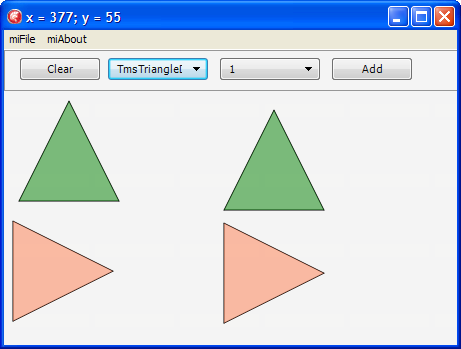
That is how our triangles look like:


Further, we inherit a so-called “small triangle”:
type
  TmsSmallTriangle = class(TmsTriangleDirectionRight)
  protected
    function FillColor: TAlphaColor; override;
  public
    class function InitialHeight: Single; override;
  end; // TmsSmallTriangle
As you can see, all we have done is overridden functions that are unique for the new triangle. Next, we’ll add a class of an arrowed line inherited from an ordinary line. Only the procedure of drawing the primitive will be overridden in the class, in other words, the line will be drawn by a base class and the triangle is an heir.
procedure TmsLineWithArrow.DoDrawTo(const aCtx: TmsDrawContext);
var
  l_Proxy : TmsShape;
  l_OriginalMatrix: TMatrix;
  l_Matrix: TMatrix;
  l_Angle : Single;
  l_CenterPoint : TPointF;

  l_TextRect : TRectF;
begin
  inherited;
  if (StartPoint <> FinishPoint) then
  begin
    l_OriginalMatrix := aCtx.rCanvas.Matrix;
    try
    l_Proxy := TmsSmallTriangle.Create(FinishPoint);
      try
        // Just yet in order to experiment we specify rotation by 0 degrees
        // to ensure the triangle is drawn correctly
        l_Angle := DegToRad(0);

        l_CenterPoint := TPointF.Create(FinishPoint.X , FinishPoint.Y);

        // We’ve stored the initial matrix 
        l_Matrix := l_OriginalMatrix;
        // We’ve transferred the origin of coordinates in the point where a rotation will be made
        l_Matrix := l_Matrix * TMatrix.CreateTranslation(-l_CenterPoint.X, -l_CenterPoint.Y);
        // The process itself
        l_Matrix := l_Matrix * TMatrix.CreateRotation(l_Angle);
        // We’ve put back the origin of the coordinates
        l_Matrix := l_Matrix * TMatrix.CreateTranslation(l_CenterPoint.X, l_CenterPoint.Y);
        
        // We are applying our space matrix to the canvas
        aCanvas.SetMatrix(l_Matrix);

        // We’re drawing :) 
        l_Proxy.DrawTo(aCanvas, aOrigin);
      finally
        FreeAndNil(l_Proxy);
      end; // try..finally
    finally
      // Since we’ve drawn the required figure we put back the initial matrix to the canvas
      aCanvas.SetMatrix(l_OriginalMatrix);
    end;
  end;//(StartPoint <> FinishPoint)
end;
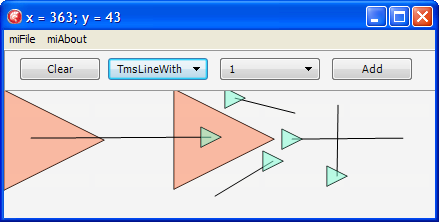
There is nothing much to explain, everything is already given in the commentaries. Anyway, if you wish to recollect what vector algebra is and how to work with vector graphic (moving, figures rotation and so on) I recommend a remarkable post on Habr on this subject as well as articles here and here.  As shown in the picture, our triangle is now drawn only if we draw a line from left to right:

Now the task becomes more interesting. We have to rotate a triangle perpendicular to the line that has drawn it. In order to do this we’ll introduce method GetArrowAngleRotation calculating the rotation angle. Let us imagine that our line is a hypotenuse of a right-angled triangle; then let’s find an angle with a leg of the triangle. By this angle the triangle will rotate around the line:

function TmsLineWithArrow.GetArrowAngleRotation: Single;
var
  l_ALength, l_CLength, l_AlphaAngle, l_X, l_Y, l_RotationAngle: Single;
  l_PointC: TPointF;
  l_Invert: SmallInt;
begin
  Result := 0;

  // The formula for calculating the distance between two points  
  l_X := (FinishPoint.X - StartPoint.X) * (FinishPoint.X - StartPoint.X);
  l_Y := (FinishPoint.Y - StartPoint.Y) * (FinishPoint.Y - StartPoint.Y);

  // We find the length of the hypotenuse of the right-angled triangle
  l_CLength := sqrt(l_X + l_Y);

  l_PointC := TPointF.Create(FinishPoint.X, StartPoint.Y);

  // The formula for calculating the distance between two points
  l_X := (l_PointC.X - StartPoint.X) * (l_PointC.X - StartPoint.X);
  l_Y := (l_PointC.Y - StartPoint.Y) * (l_PointC.Y - StartPoint.Y);

  // We find the length of the leg
  l_ALength := sqrt(l_X + l_Y);

  // The angle in radians
  l_AlphaAngle := ArcSin(l_ALength / l_CLength);

  l_RotationAngle := 0;
  l_Invert := 1;

  if FinishPoint.X > StartPoint.X then
  begin
    l_RotationAngle := Pi / 2 * 3;
    if FinishPoint.Y > StartPoint.Y then
      l_Invert := -1;
  end
  else
  begin
    l_RotationAngle := Pi / 2;
    if FinishPoint.Y < StartPoint.Y then
      l_Invert := -1;
  end;

  Result := l_Invert * (l_AlphaAngle + l_RotationAngle);
end;

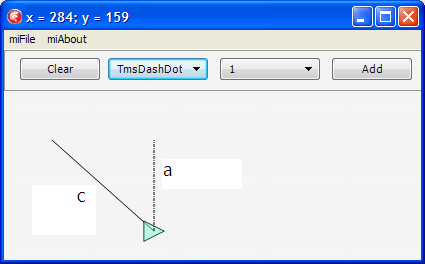
Now our line looks like this:

Next, we’ll add an object responsible for moving of the figures.
We’ll use the following algorithm:
1. We need a method to determine whether a point gets to a specific figure, say ContainsPt, for each figure. Since formulas for calculating the getting are unique for each figure, we’ll use virtual functions.
2. The next method is required to determine which figure the point has got to in case figures cross. Since the figures get on the list as they appear on the form, provided that figures cross, the figure at the beginning of the list is the last to have appeared and is therefore at the top. In fact, there’s a pitfall in this logic, but for now let’s assume it is right and leave the correction for the next post.
3. On the first click in the figure to which we’ve got we have to change its outline or a number of other characteristics.
4. On the second click we have to move the figure to which we’ve got.
The class of the moving will be inherited from a standard figure, but it will store a figure that it moves, and this class is the one to redraw the figure on the second click (I have described the peculiarities of drawing the lines in my previous post).

We implement the methods I’ve described.
1. This method detects whether a point gets to a figure (in our case it is a rectangle):
function TmsRectangle.ContainsPt(const aPoint: TPointF): Boolean;
var
  l_Finish : TPointF;
  l_Rect: TRectF;
begin
  Result := False;
  l_Finish := TPointF.Create(StartPoint.X + InitialWidth,
                             StartPoint.Y + InitialHeight);
  l_Rect := TRectF.Create(StartPoint,l_Finish);
  Result := l_Rect.Contains(aPoint);
end;
2. This method is used to detect which figure we’ve got to:
class function TmsShape.ShapeByPt(const aPoint: TPointF; aList: TmsShapeList): TmsShape;
var
  l_Shape: TmsShape;
  l_Index: Integer;
begin
  Result := nil;
  for l_Index := aList.Count - 1 downto 0 do
  begin
    l_Shape := aList.Items[l_Index];
    if l_Shape.ContainsPt(aPoint) then
    begin
      Result := l_Shape;
      Exit;
    end; // l_Shape.ContainsPt(aPoint)
  end; // for l_Index
end;
3. On the first click in the figure that we’ve got to we have to change its outline or a number of other characteristics. To implement this method we’ll perform a slight refactoring. We introduce a so-called “drawing context”:
type
  TmsDrawContext = record
  public
    rCanvas: TCanvas;
    rOrigin: TPointF;
    rMoving: Boolean; // We define that the currently drawn primitive is moving
    constructor Create(const aCanvas: TCanvas; const aOrigin: TPointF);
  end; // TmsDrawContext
If we specify the figure as “movable” in the drawing context, the drawing will be performed in the different way.
procedure TmsShape.DrawTo(const aCtx: TmsDrawContext);
begin
  aCtx.rCanvas.Fill.Color := FillColor;
  if aCtx.rMoving then
  begin
    aCtx.rCanvas.Stroke.Dash := TStrokeDash.sdDashDot;
    aCtx.rCanvas.Stroke.Color := TAlphaColors.Darkmagenta;
    aCtx.rCanvas.Stroke.Thickness := 4;
  end
  else
  begin
    aCtx.rCanvas.Stroke.Dash := StrokeDash;
    aCtx.rCanvas.Stroke.Color := StrokeColor;
    aCtx.rCanvas.Stroke.Thickness := StrokeThickness;
  end;
  DoDrawTo(aCtx);
end;
4. On the second click we have to move the figure to which we’ve got. To begin with, let’s introduce a factory method responsible for figure constructing (the list of the figures is required so that TmsMover could call all the figures drawn within the current diagram).
class function TmsShape.Make(const aStartPoint: TPointF; aListWithOtherShapes: TmsShapeList): TmsShape;
begin
  Result := Create(aStartPoint);
end;
... 
class function TmsMover.Make(const aStartPoint: TPointF;
                                   aListWithOtherShapes: TmsShapeList): TmsShape;
var
  l_Moving: TmsShape;
begin
  l_Moving := ShapeByPt(aStartPoint, aListWithOtherShapes);
  if (l_Moving <> nil) then
    Result := Create(aStartPoint, aListWithOtherShapes, l_Moving)
  else
    Result := nil;
end;
As a result of using class function we’ve fundamentally separated creating of the moved object and of the other figures. However, this approach has a disadvantage. For instance, we introduced a parameter of creating aListWithOtherShapes which is not required for the other figures at all.
type
  TmsMover = class(TmsShape)
  private
    f_Moving: TmsShape;
    f_ListWithOtherShapes: TmsShapeList;
  protected
    procedure DoDrawTo(const aCtx: TmsDrawContext); override;
    constructor Create(const aStartPoint: TPointF; aListWithOtherShapes: TmsShapeList; aMoving: TmsShape);
  public
    class function Make(const aStartPoint: TPointF; aListWithOtherShapes: TmsShapeList): TmsShape; override;
    class function IsNeedsSecondClick: Boolean; override;
    procedure EndTo(const aFinishPoint: TPointF); override;
  end; // TmsMover

implementation

uses
  msRectangle,
  FMX.Types,
  System.SysUtils;

constructor TmsMover.Create(const aStartPoint: TPointF; aListWithOtherShapes: TmsShapeList; aMoving: TmsShape);
begin
  inherited Create(aStartPoint);
  f_ListWithOtherShapes := aListWithOtherShapes;
  f_Moving := aMoving;
end;

class function TmsMover.Make(const aStartPoint: TPointF;
                                   aListWithOtherShapes: TmsShapeList): TmsShape;
var
  l_Moving: TmsShape;
begin
  l_Moving := ShapeByPt(aStartPoint, aListWithOtherShapes);
  if (l_Moving <> nil) then
    Result := Create(aStartPoint, aListWithOtherShapes, l_Moving)
  else
    Result := nil;
end;

class function TmsMover.IsNeedsSecondClick: Boolean;
begin
  Result := true;
end;

procedure TmsMover.EndTo(const aFinishPoint: TPointF);
begin
  if (f_Moving <> nil) then
    f_Moving.MoveTo(aFinishPoint);
  f_ListWithOtherShapes.Remove(Self);
  // Now I must delete MYSELF since we do not need mover in the general list after it has performed its function
end;

procedure TmsMover.DoDrawTo(const aCtx: TmsDrawContext);
var
  l_Ctx: TmsDrawContext;
begin
  if (f_Moving <> nil) then
  begin
    l_Ctx := aCtx;
    l_Ctx.rMoving := true;
    f_Moving.DrawTo(l_Ctx);
  end; // f_Moving <> nil
end;

initialization

TmsMover.Register;

end.
In the controller we just have to change methods of figures creating:
procedure TmsDiagramm.BeginShape(const aStart: TPointF);
begin
  Assert(CurrentClass <> nil);
  FCurrentAddedShape := CurrentClass.Make(aStart, FShapeList);
  if (FCurrentAddedShape <> nil) then
  begin
    FShapeList.Add(FCurrentAddedShape);
    if not FCurrentAddedShape.IsNeedsSecondClick then
      FCurrentAddedShape := nil;
    Invalidate;
  end; // FCurrentAddedShape <> nil
end;

procedure TmsDiagramm.EndShape(const aFinish: TPointF);
begin
  Assert(CurrentAddedShape <> nil);
  CurrentAddedShape.EndTo(aFinish);
  FCurrentAddedShape := nil;
  Invalidate;
end;
In case of mover a call CurrentAddedShape.EndTo(aFinish) calls another one - MoveTo, i.e. moves the figure, and the redrawing, as shown above, is initiated by the controller:
procedure TmsMover.EndTo(const aFinishPoint: TPointF);
begin
  if (f_Moving <> nil) then
    f_Moving.MoveTo(aFinishPoint);
  f_ListWithOtherShapes.Remove(Self);
  // Now I must delete MYSELF since we do not need mover in the general list after it has performed its function
end;

...

procedure TmsShape.MoveTo(const aFinishPoint: TPointF);
begin
  FStartPoint := aFinishPoint;
end;
Since the controller is responsible for figures behavior, we’ll take the method of checking the “getting to a figure” away to the controller, and while creating the objects we’ll pass a check function:
type
  TmsShapeByPt = function (const aPoint: TPointF): TmsShape of object;
...
class function Make(const aStartPoint: TPointF; aShapeByPt: TmsShapeByPt): TmsShape; override;
...
procedure TmsDiagramm.BeginShape(const aStart: TPointF);
begin
 Assert(CurrentClass <> nil);
 // The call itself
 FCurrentAddedShape := CurrentClass.Make(aStart, Self.ShapeByPt);
 if (FCurrentAddedShape <> nil) then
 begin
  FShapeList.Add(FCurrentAddedShape);
  if not FCurrentAddedShape.IsNeedsSecondClick then
   FCurrentAddedShape := nil;
  Invalidate;
 end;//FCurrentAddedShape <> nil
end;
Since we have to pass two parameters in order to create objects, we define a context of “creating”:
type
  TmsMakeShapeContext = record
  public
    rStartPoint: TPointF;
    rShapeByPt: TmsShapeByPt;
    constructor Create(aStartPoint: TPointF; aShapeByPt: TmsShapeByPt);
  end;//TmsMakeShapeContext
Let’s add interfaces implemented by the controller and also a class of interface object. In the future we’ll realise our own reference counting in it.
type
  TmsInterfacedNonRefcounted = class abstract(TObject)
  protected
    function QueryInterface(const IID: TGUID; out Obj): HResult; stdcall;
    function _AddRef: Integer; stdcall;
    function _Release: Integer; stdcall;
  end;//TmsInterfacedNonRefcounted

  TmsShape = class;

  ImsShapeByPt = interface
    function ShapeByPt(const aPoint: TPointF): TmsShape;
  end;//ImsShapeByPt

  ImsShapesController = interface
    procedure RemoveShape(aShape: TmsShape);
  end;//ImsShapeRemover
Let’s slightly change TmsMakeShapeContext:
type
  TmsMakeShapeContext = record
  public
    rStartPoint: TPointF;
    rShapesController: ImsShapesController;
    constructor Create(aStartPoint: TPointF; const aShapesController: ImsShapesController);
  end; // TmsMakeShapeContext
I recommend two interesting posts on interfaces and details of working with them in Delphi: 18delphi.blogspot.com/2013/04/iunknown.html  and habrahabr.ru/post/181107/
Let’s ensure that our controller (TmsDiagramm) inherits from TmsInterfacedNonRefcounted and the interfaces. Let us also change one line in BeginShape method. We had the following:
  FCurrentAddedShape := CurrentClass.Make(aStart, Self.ShapeByPt);
And it became like this:
  FCurrentAddedShape := CurrentClass.Make(TmsMakeShapeContext.Create(aStart, Self));
In case of moving, EndTo method will look as follows:
procedure TmsMover.EndTo(const aCtx: TmsEndShapeContext);
begin
  if (f_Moving <> nil) then
    f_Moving.MoveTo(aCtx.rStartPoint);
  f_Moving := nil;
  aCtx.rShapesController.RemoveShape(Self);
  // Now I must delete MYSELF
end;
In the previous post I’ve told about hiding of “unique configurations” (filling color, line width, etc.) in virtual methods that each figure defines independently. For example:
function TmsTriangle.FillColor: TAlphaColor;
begin
 Result := TAlphaColorRec.Green;
end;
We pack all figures configurations in the context:
type
  TmsDrawOptionsContext = record 
  public
    rFillColor: TAlphaColor;
    rStrokeDash: TStrokeDash;
    rStrokeColor: TAlphaColor;
    rStrokeThickness: Single;
    constructor Create(const aCtx: TmsDrawContext);
  end;//TmsDrawOptionsContext
In TmsShape class we make a virtual procedure similarly to the previous example. In the future we’ll easily expand the number of unique figure configurations:
procedure TmsTriangle.TransformDrawOptionsContext(var theCtx: TmsDrawOptionsContext);
begin
  inherited;
  theCtx.rFillColor := TAlphaColorRec.Green;
  theCtx.rStrokeColor := TAlphaColorRec.Blue; 
end;
Using the context we put the logic (do we really draw a mover?) away from the method of drawing and hide it in the record constructor:
constructor TmsDrawOptionsContext.Create(const aCtx: TmsDrawContext);
begin
  rFillColor := TAlphaColorRec.Null;
  if aCtx.rMoving then
  begin
    rStrokeDash := TStrokeDash.sdDashDot;
    rStrokeColor := TAlphaColors.Darkmagenta;
    rStrokeThickness := 4;
  end // aCtx.rMoving
  else
  begin
    rStrokeDash := TStrokeDash.sdSolid;
    rStrokeColor := TAlphaColorRec.Black;
    rStrokeThickness := 1;
  end; // aCtx.rMoving
end;
After that our method of drawing becomes like this:
procedure TmsShape.DrawTo(const aCtx: TmsDrawContext);
var
  l_Ctx: TmsDrawOptionsContext;
begin
  l_Ctx := DrawOptionsContext(aCtx);
  aCtx.rCanvas.Fill.Color := l_Ctx.rFillColor;
  aCtx.rCanvas.Stroke.Dash := l_Ctx.rStrokeDash;
  aCtx.rCanvas.Stroke.Color := l_Ctx.rStrokeColor;
  aCtx.rCanvas.Stroke.Thickness := l_Ctx.rStrokeThickness;
  DoDrawTo(aCtx);
end;

function TmsShape.DrawOptionsContext(const aCtx: TmsDrawContext): TmsDrawOptionsContext;
begin
  Result := TmsDrawOptionsContext.Create(aCtx);
  // We get the configurations for each figure
  TransformDrawOptionsContext(Result);
end;
The only thing left to make our figures movable is to code for each figure ContainsPt method responsible for checking if a point gets to a figure. This is a routine trigonometry; all the formulas can be found on the Internet.


Let’s somewhat make over object registration in the container. Now each class registers itself. Let’s put registration into a separate module.
unit msOurShapes;

interface
uses
  msLine,
  msRectangle,
  msCircle,
  msRoundedRectangle,
  msUseCaseLikeEllipse,
  msTriangle,
  msDashDotLine,
  msDashLine,
  msDotLine,
  msLineWithArrow,
  msTriangleDirectionRight,
  msMover,
  msRegisteredShapes
  ; 
implementation

procedure RegisterOurShapes;
begin
  TmsRegisteredShapes.Instance.Register([
    TmsLine,
    TmsRectangle,
    TmsCircle,
    TmsRoundedRectangle,
    TmsUseCaseLikeEllipse,
    TmsTriangle,
    TmsDashDotLine,
    TmsDashLine,
    TmsDotLine,
    TmsLineWithArrow,
    TmsTriangleDirectionRight,
    TmsMover
   ]);
end;

initialization
 RegisterOurShapes;

end.
Let’s add registration method in the container:
procedure TmsRegisteredShapes.Register(const aShapes: array of RmsShape);
var
  l_Index: Integer;
begin
  for l_Index := Low(aShapes) to High(aShapes) do
    Self.Register(aShapes[l_Index]);
end;

procedure TmsRegisteredShapes.Register(const aValue: RmsShape);
begin
  Assert(f_Registered.IndexOf(aValue) < 0);
  f_Registered.Add(aValue);
end;


In this post we’ve tried to show how to make our life easier by using contexts, interfaces and the fabric method. More details on the fabric method you can find here and here. In the next post we will tell how we’ve “tied” DUnit to FireMonkey. We will also develop a number of tests, some of which will cause an error at once.

Source

понедельник, 24 ноября 2014 г.

MindStream. How we develop software for FireMonkey


Original post in Russian - http://habrahabr.ru/post/232955/

Table of contents

A month ago we decided to write a cross-platform application using FireMonkey. As a direction we chose drawing the graphics primitives with a possibility of saving and data restoring.

The process of writing the application was agreed to be described in details on this blog.

The articles will disclose practical use of various techniques such as Dependency Injection, the factory method, contexts, controllers and so on. The plan for the nearest future is to widen this set with DUnit tests. At the moment DUnit does not exist for FMX, so we will have to come up with our own ideas.

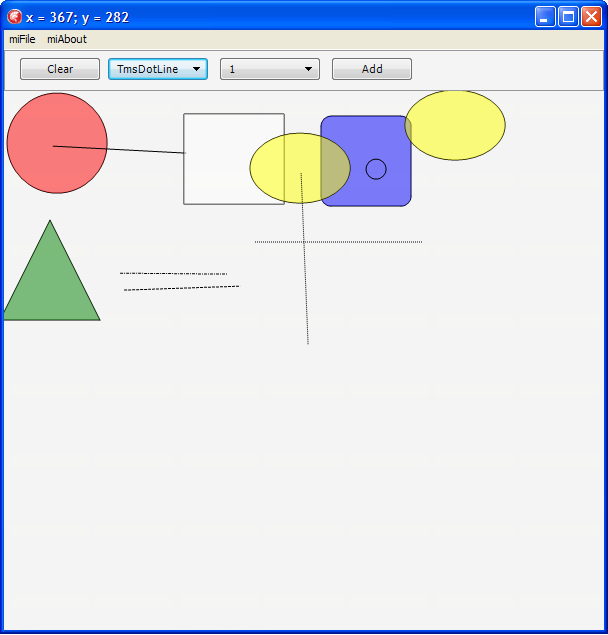
We’ll start with a working prototype that by the moment of ending the article will look like this:

To begin with, we will have to create an app that draws on Canvas. The first primitives that will be added to the program are a rectangle and a line.For that we place TImage object on a form and also add creating the Bitmap method:

procedure TfmMain.FormCreate(Sender: TObject);
begin
 imgMain.Bitmap := TBitmap.Create(400, 400);
 imgMain.Bitmap.Clear(TAlphaColorRec.White);
end;

The procedure of drawing the rectangle:

procedure TfmMain.btnRectClick(Sender: TObject);
begin
 imgMain.Bitmap.Canvas.BeginScene;
 imgMain.Bitmap.Canvas.DrawRect(TRectF.Create(10, 10, 200, 270),
                                30, 60,
                                AllCorners, 100,
                                TCornerType.ctRound);
 imgMain.Bitmap.Canvas.EndScene;
end;
For the line it is even simpler:

 ImgMain.Bitmap.Canvas.BeginScene;
 ImgMain.Bitmap.Canvas.DrawLine(FStartPos, TPointF.Create(X, Y), 1);
 ImgMain.Bitmap.Canvas.EndScene;
Next we define a class for TMyShape figures, from which our figures TLine and TRectangle are inherited:

type 
 TMyShape = class
 private
  FStartPoint, FFinalPoint: TPointF;
 public
  Constructor Create(aStartPoint, aFinalPoint: TPointF); overload;
  procedure DrawTo(aCanvas : TCanvas);
  procedure DrawShape(aCanvas : TCanvas); virtual; abstract;
 end;

 TLine = class(TMyShape)
 private
   procedure DrawShape(aCanvas : TCanvas); override;
 end;

 TRectangle = class(TMyShape)
 private
   procedure DrawShape(aCanvas : TCanvas); override;
 end;

procedure TMyShape.DrawTo(aCanvas: TCanvas);
begin
  aCanvas.BeginScene;
  DrawShape(aCanvas);
  aCanvas.EndScene;
end;

As we can see, DrawTo method accounts for preparing a canvas for drawing and calls a virtual method for drawing each figure.
Let us create TDrawness class intended for storing of all the figures and drawing of them.


type
 TDrawness = class
 private
  FShapeList : TObjectList;
    function GetShapeList: TObjectList;
 public
  constructor Create;
  destructor Destroy; override;
  procedure DrawTo(aCanvas : TCanvas);
 property ShapeList : TObjectList read GetShapeList;
 end;
The DrawTo procedure looks throughout the list and calls an appropriate method for each object:
procedure TDrawness.DrawTo(aCanvas: TCanvas);
var
 i : Integer;
begin
 for i:= 0 to FShapeList.Count-1
  do FShapeList[i].DrawTo(aCanvas);
end;

In other words, each figure that we want to memorize has to be added to Drawness. For example, the code of creating a rectangle becomes this like:

procedure TfmMain.btnRectClick(Sender: TObject);
var
 l_StartPoint, l_FinalPoint: TPointF;
begin
 l_StartPoint := TPointF.Create(StrToFloat(edtStartPointX.Text),
                                StrToFloat(edtStartPointY.Text));
 l_FinalPoint := TPointF.Create(StrToFloat(edtFinalPointX.Text),
                                StrToFloat(edtFinalPointY.Text));
 FDrawness.ShapeList.Add(TRectangle.Create(l_StartPoint, l_FinalPoint));
 FDrawness.ShapeList.Last.DrawTo(imgMain.Bitmap.Canvas);
end;
The last line in the method is necessary in order to draw the figure we’ve added just before. To draw lines we add a small circle that will be drawn at the starting and the ending points of the line:
type
 TmsPointCircle= class(TMyShape)
 private
   procedure DrawShape(const aCanvas : TCanvas); override;
 end;

procedure TmsPointCircle.DrawShape(const aCanvas: TCanvas);
var
 l_StartPoint, l_FinalPoint: TPointF;
begin
 l_StartPoint.X := FStartPoint.X - 15;
 l_StartPoint.Y := FStartPoint.Y - 15;

 l_FinalPoint.X := FStartPoint.X + 15;
 l_FinalPoint.Y := FStartPoint.Y + 15;

 aCanvas.DrawEllipse(TRectF.Create(l_StartPoint, l_FinalPoint), 1);
end;
Next we develop an app to add lines only on the second click of the mouse, meanwhile we do straight:
procedure TfmMain.imgMainMouseDown(Sender: TObject; Button: TMouseButton;
  Shift: TShiftState; X, Y: Single);
begin
 FPressed := True;
 FStartPos := TPointF.Create(X, Y);

 if FIsFirstClick then
  FIsFirstClick := False
 else
 begin
  FDrawness.ShapeList.Add(TLine.Create(FStartPos, FLastPoint));
  FDrawness.ShapeList.Last.DrawTo(imgMain.Bitmap.Canvas);

  FIsFirstClick := True;
 end;

 FLastPoint := TPointF.Create(X, Y);

 FDrawness.ShapeList.Add(TmsPointCircle.Create(FStartPos, FLastPoint));
 FDrawness.ShapeList.Last.DrawTo(imgMain.Bitmap.Canvas);
end;

Let us make a small refactoring and add AddPrimitive method to TDrawness method:

procedure TmsDrawness.AddPrimitive(const aShape: TmsShape);
begin
 FShapeList.Add(aShape);
end;

And here we’ll use Dependency Injection. We create container to store types of all our figures. For that we use the list of TmsShape metaclass. The container we make using Singleton, because we need the list of the types of our figures as singleton, and we add AddPrimitive method there.

unit msRegisteredPrimitives;

interface

uses
 msShape, Generics.Collections;

type
 RmsShape = class of TmsShape;

 TmsRegistered = TList;

 TmsRegisteredPrimitives  = class
 strict private
  FmsRegistered : TmsRegistered;
  class var FInstance: TmsRegisteredPrimitives;
  constructor Create;
 public
  class function GetInstance: TmsRegisteredPrimitives;
  procedure AddPrimitive(const Value : RmsShape);
 end;


implementation

procedure TmsRegisteredPrimitives.AddPrimitive(const Value: RmsShape);
begin
 FmsRegistered.Add(Value);
end;

constructor TmsRegisteredPrimitives.Create;
 begin
  inherited;
 end;

 class function TmsRegisteredPrimitives.GetInstance: TmsRegisteredPrimitives;
 begin
  If FInstance = nil Then
  begin
   FInstance := TmsRegisteredPrimitives.Create();
  end;
  Result := FInstance;
 end;

end.

A registration of each class inherited from TMsShape will be used as a dependency injection.
initialization
 TmsRegisteredPrimitives.GetInstance.AddPrimitive(TmsLine);
 TmsRegisteredPrimitives.GetInstance.AddPrimitive(TmsRectangle);
end.

We load (on FormCreate) the list of our primitives in ComboBox so that to call them in more convenient way:

for i := 0 to TmsRegisteredPrimitives.GetInstance.PrimitivesCount-1 do
 cbbPrimitives.Items.AddObject(TmsRegisteredPrimitives.GetInstance.Primitives[i].ClassName,                               TObject(TmsRegisteredPrimitives.GetInstance.Primitives[i]));

Then by means of the simplest operation we can create the primitive we’ve chosen in ComboBox:

FDrawness.AddPrimitive(RmsShape(cbbPrimitives.items.Objects[cbbPrimitives.ItemIndex]).Create(TPointF.Create(X,Y),TPointF.Create(X+100,Y+100)));

We add class method IsNeedsSecondClick to the object TmsShape. This method will be redefined in descendents. True is for the lines, False is for the others.
Let us add to TmsDrawness a new field, which will be responsible for the class chosen in ComboBox:

property CurrentClass : RmsShape read FCurrentClass write FCurrentClass;

In this connection we add the following to ComboBox.OnChange:

FDrawness.CurrentClass := RmsShape(cbbPrimitives.items.Objects[cbbPrimitives.ItemIndex]);

We rewrite adding the figure to Drawness:

ShapeObject := FDrawness.CurrentClass.Create(FStartPos, FLastPoint);
 FDrawness.AddPrimitive(ShapeObject);

Since Drawness is responsible for drawing all figures, we add to it the method of Canvas clearing:

procedure TmsDrawness.Clear(const aCanvas: TCanvas);
begin
 aCanvas.BeginScene;
 aCanvas.Clear(TAlphaColorRec.Null);
 aCanvas.EndScene;
end;

And now we rewrite the drawing procedure. Before drawing we will clear Canvas and then draw all the objects from Drawness.List.

procedure TmsDrawness.DrawTo(const aCanvas: TCanvas; const aOrigin : TPointF);
var
 i : Integer;
begin
 Clear(aCanvas);

 for i:= 0 to FShapeList.Count-1
  do FShapeList[i].DrawTo(aCanvas, aOrigin);
end;

Since we ensured the work of the prototype, it is time to start refactoring and namely building the architecture of the application.
To begin with, we transfer object creation to TDrawness.AddPrimitive method and stop creating it on the form.

procedure TmsDrawness.AddPrimitive(const aStart: TPointF; const aFinish: TPointF);
begin
 Assert(CurrentClass <> nil);
 FShapeList.Add(CurrentClass.Create(aStart, aFinish));
end;

Next, we change the algorithm of creating and adding the new figure. Instead of direct adding the primitive to the list, let us introduce intermediate object like TmsShape. The code of adding the primitive now looks like this:

procedure TmsDrawness.AddPrimitive(const aStart: TPointF; const aFinish: TPointF);
begin
 Assert(CurrentClass <> nil);
 FCurrentAddedShape := CurrentClass.Create(aStart, aFinish);
 FShapeList.Add(FCurrentAddedShape);
end;

Then we check the current class to see whether it needs the second mouse click to draw.

procedure TmsDrawness.AddPrimitive(const aStart: TPointF; const aFinish: TPointF);
begin
 Assert(CurrentClass <> nil);
 FCurrentAddedShape := CurrentClass.Create(aStart, aFinish);
 FShapeList.Add(FCurrentAddedShape);
 if not FCurrentAddedShape.IsNeedsSecondClick then
 // - if there is no need in SecondClick, then our primitive is finished
  FCurrentAddedShape := nil;
end;

At the same time we change adding of primitives on the form:

procedure TfmMain.imgMainMouseDown(Sender: TObject; Button: TMouseButton;
  Shift: TShiftState; X, Y: Single);
var
 l_StartPoint : TPointF;
begin
 l_StartPoint := TPointF.Create(X, Y);

 if (FDrawness.CurrentAddedShape = nil) then
 // - we HAVE NOT added the primitive – we have to ADD it 
  FDrawness.AddPrimitive(l_StartPoint, l_StartPoint)
 else
  FDrawness.FinalizeCurrentShape(l_StartPoint);

 FDrawness.DrawTo(imgMain.Bitmap.Canvas, FOrigin);
end;

So, what do we have.
If we need to draw a line, our CurrentAddedShape equals zero on the first click. That is why we added the primitive with the same points of start and end of the section.
Then in FDrawness.AddPrimitive we check the current class. Since (in case of a line) it needs the second click we do nothing.
After that we redraw all objects. At this moment nothing can be drawn, because a line with the same starting and ending points simply can not be drawn.
When a user clicks the mouse for the second time, we check again CurrentAddedShape, and since we didn’t release it we call the method of figure finalization, where we locate the second point of the line, and we release our buffer object:

procedure TmsDrawness.FinalizeCurrentShape(const aFinish: TPointF);
begin
  Assert(CurrentAddedShape <> nil);
  CurrentAddedShape.FinalPoint := aFinish;
  FCurrentAddedShape := nil;
end;

And again we redraw all figures.
For the rest of the figures in FDrawness.AddPrimitive after adding the figure to the list we release our “buffer” at once.
After a little refactoring (we rename our methods more responsibly and transfer processing of the mouse click to Drawness) we get the following situation:

procedure TmsDiagramm.ProcessClick(const aStart: TPointF);
begin
 if ShapeIsEnded then
 // - we HAVE NOT added the primitive – we have to ADD it 
 BeginShape(aStart)
 else
  EndShape(aStart);
end;

function TmsDiagramm.ShapeIsEnded: Boolean;
begin
 Result := (CurrentAddedShape = nil);
end;

procedure TmsDiagramm.BeginShape(const aStart: TPointF);
begin
 Assert(CurrentClass <> nil);
 FCurrentAddedShape := CurrentClass.Create(aStart, aStart);
 FShapeList.Add(FCurrentAddedShape);
 if not FCurrentAddedShape.IsNeedsSecondClick then
 // - if there is no need in SecondClick, then our primitive is finished
  FCurrentAddedShape := nil;
 Invalidate;
end;

procedure TmsDiagramm.EndShape(const aFinish: TPointF);
begin
 Assert(CurrentAddedShape <> nil);
 CurrentAddedShape.EndTo(aFinish);
 FCurrentAddedShape := nil;
 Invalidate;
end;

procedure TmsDiagramm.Invalidate;
begin
 Clear;
 DrawTo(FCanvas, FOrigin);
end;

Since TDrawness is already in fact a controller of drawing, its purpose is to prepare Canvas to the drawing, at the same time we use the enumerator:

procedure TmsDrawness.DrawTo(const aCanvas: TCanvas; const aOrigin : TPointF);
var
 l_Shape : TmsShape;
begin
 aCanvas.BeginScene;
 try
  for l_Shape in FShapeList do
   l_Shape.DrawTo(aCanvas, aOrigin);
 finally
  aCanvas.EndScene;
 end;//try..finally
end;

While drawing the line we draw the circle in place of the first click:

procedure TmsLine.DrawTo(const aCanvas : TCanvas; const aOrigin : TPointF);
var
 l_Proxy : TmsShape;
begin
 if (StartPoint = FinishPoint) then
 begin
  l_Proxy := TmsPointCircle.Create(StartPoint, StartPoint);
  try
   l_Proxy.DrawTo(aCanvas, aOrigin);
  finally
   FreeAndNil(l_Proxy);
  end;//try..finally
 end//StartPoint = FinishPoint
 else
  aCanvas.DrawLine(StartPoint.Add(aOrigin),
                   FinishPoint.Add(aOrigin), 1);
end;

As you can see, we create and draw a small circle, but we do not add it to the list of the primitives in Drawness, so on the second mouse click our canvas will be redrawn, and there will be no circle.
We add a new figure – a circle:

type
 TmsCircle = class(TmsShape)
 protected
  procedure DrawShape(const aCanvas : TCanvas; const aOrigin : TPointF); override;
 public
  class function IsNeedsSecondClick : Boolean; override;
 end;

implementation

const
 c_CircleRadius = 50;

{ TmsCircle }

procedure TmsCircle.DrawShape(const aCanvas: TCanvas; const aOrigin : TPointF);
var
 l_StartPoint, l_FinalPoint: TPointF;
begin
 l_StartPoint.X := FStartPoint.X - c_CircleRadius;
 l_StartPoint.Y := FStartPoint.Y - c_CircleRadius;

 l_FinalPoint.X := FStartPoint.X + c_CircleRadius;
 l_FinalPoint.Y := FStartPoint.Y + c_CircleRadius;

 aCanvas.DrawEllipse(TRectF.Create(l_StartPoint.Add(aOrigin),
                                   l_FinalPoint.Add(aOrigin)), 1);
end;

class function TmsCircle.IsNeedsSecondClick: Boolean;
begin
 Result := False;
end;

end.

In the class of the circle we replace the constant by the call of a virtual method:

class function TmsCircle.Radius: Integer;
begin
 Result := 50;
end;

As a result, in the class for the small circle we have only to redefine Radius method:

type
 TmsPointCircle = class(TmsCircle)
 protected
  class function Radius: Integer; override;
 end;

implementation

{ TmsPointCircle }

class function TmsPointCircle.Radius: Integer;
begin
 Result := 10;
end;

end.

We complete our Dependency Injection, transfer class registration from the container to each class and add a new method Register to TmsShape. We also declare it as abstract.
Class TmsShape now looks like this:

type
 TmsShape = class abstract (TObject)
 private
  FStartPoint: TPointF;
  FFinishPoint: TPointF;
 protected
  property StartPoint : TPointF read FStartPoint;
  property FinishPoint : TPointF read FFinishPoint;
  class procedure Register;
 public
  constructor Create(const aStartPoint, aFinishPoint: TPointF); virtual;
  procedure DrawTo(const aCanvas : TCanvas; const aOrigin : TPointF); virtual; abstract;
  class function IsNeedsSecondClick : Boolean; virtual;
  procedure EndTo(const aFinishPoint: TPointF);
 end;

implementation

uses
  msRegisteredPrimitives
  ;

class procedure TmsShape.Register;
begin
 TmsRegisteredPrimitives.Instance.AddPrimitive(Self);
end;

constructor TmsShape.Create(const aStartPoint, aFinishPoint: TPointF);
begin
 FStartPoint := aStartPoint;
 FFinishPoint := aFinishPoint;
end;

procedure TmsShape.EndTo(const aFinishPoint: TPointF);
begin
 FFinishPoint := aFinishPoint;
end;

class function TmsShape.IsNeedsSecondClick : Boolean;
begin
 Result := false;
end;

end.

A line about class registration has now emerged in each class, for example in TmsRectangle class:

initialization
 TmsRectangle.Register;

As a next primitive we add a rectangle with rounded edges:

type
 TmsRoundedRectangle = class(TmsRectangle)
 protected
  procedure DrawTo(const aCanvas : TCanvas; const aOrigin : TPointF); override;
 end;//TmsRoundedRectangle

implementation

procedure TmsRoundedRectangle.DrawTo(const aCanvas: TCanvas; const aOrigin : TPointF);
begin
 aCanvas.DrawRect(TRectF.Create(StartPoint.Add(aOrigin),
                                FinishPoint.Add(aOrigin)),
                  10, 10,
                  AllCorners, 1,
                  TCornerType.ctRound);
end;

initialization
 TmsRoundedRectangle.Register;

end.

That is all! Thanks to the registration of the form in the container, this is the whole code we need.
Once more.
We have to inherit a class from any figure and redefine the drawing method (if needed). Since TmsShape is a superclass, the class that is registered in the container will be added directly in the class method Register.
Than we have all classes from the container filling ComboBox on FormCreate.
And when we choose specific figure, the written mechanisms will work.
Then, due to inheritance and virtual functions we make drawing a new figure easier. In TmsRectangle class we introduce class method CornerRadius and change drawing, at the same time disposing of magic numbers.

class function TmsRectangle.CornerRadius: Single;
begin
 Result := 0;
end;

procedure TmsRectangle.DrawTo(const aCanvas: TCanvas; const aOrigin : TPointF);
begin
 aCanvas.DrawRect(TRectF.Create(StartPoint.Add(aOrigin),
                                FinishPoint.Add(aOrigin)),
                  CornerRadius,
                  CornerRadius,
                  AllCorners,
                  1,
                  TCornerType.ctRound);
end;


Now it is enough to just rewrite CornerRadius method in our new class with the required value of rounding the angles. In whole the class looks like this:

type
 TmsRoundedRectangle = class(TmsRectangle)
 protected
  class function CornerRadius: Single; override;
 end;//TmsRoundedRectangle

implementation

class function TmsRoundedRectangle.CornerRadius: Single;
begin
 Result := 10;
end;

initialization
 TmsRoundedRectangle.Register;

end.

Using the similar way we dispose of the constants. We also add color filling. Let us try to fill a rectangle:

procedure TmsRectangle.DrawTo(const aCanvas: TCanvas; const aOrigin : TPointF);
begin
 aCanvas.Fill.Color := TAlphaColorRec.White;
 aCanvas.DrawRect(TRectF.Create(StartPoint.Add(aOrigin),
                                FinishPoint.Add(aOrigin)),
                  CornerRadius,
                  CornerRadius,
                  AllCorners,
                  1,
                  TCornerType.ctRound);
 aCanvas.FillRect(TRectF.Create(StartPoint.Add(aOrigin),
                                FinishPoint.Add(aOrigin)),
                  CornerRadius,
                  CornerRadius,
                  AllCorners,
                  1,
                  TCornerType.ctRound);
end;

As we can see, in order to fill the figure we have to define the filling color for the canvas. So as not to duplicate the code and not to add a new parameter to drawing method, we use virtual method FillColor for TmsShape. We also rewrite the method of drawing in the superclass.
We will first define all the necessary parameters for the canvas, and only after that we will call the virtual method of drawing each figure:

procedure TmsShape.DrawTo(const aCanvas : TCanvas; const aOrigin : TPointF);
begin
 aCanvas.Fill.Color := FillColor;
 DoDrawTo(aCanvas, aOrigin);
end;

To add the next primitive we add virtual functions for the circle:

type
 TmsCircle = class(TmsShape)
 protected
  class function InitialRadiusX: Integer; virtual;
  class function InitialRadiusY: Integer; virtual;
  function FillColor: TAlphaColor; override;
  procedure DoDrawTo(const aCanvas : TCanvas; const aOrigin : TPointF); override;
 public
  constructor Create(const aStartPoint, aFinishPoint: TPointF); override;
 end;

The next primitive we make is a yellow oval:

type
 TmsUseCaseLikeEllipse = class(TmsCircle)
 protected
  class function InitialRadiusY: Integer; override;
  function FillColor: TAlphaColor; override;
 end;//TmsUseCaseLikeEllipse

implementation

class function TmsUseCaseLikeEllipse.InitialRadiusY: Integer;
begin
 Result := 35;
end;

function TmsUseCaseLikeEllipse.FillColor: TAlphaColor;
begin
 Result := TAlphaColorRec.Yellow;
end;

initialization
 TmsUseCaseLikeEllipse.Register;

end.

We add the new primitive – a triangle:

type
 TmsTriangle = class(TmsShape)
 protected
  function FillColor: TAlphaColor; override;
  procedure DoDrawTo(const aCanvas : TCanvas; const aOrigin : TPointF); override;
 end;//TmsTriangle

implementation

uses
 System.Math.Vectors
 ;

function TmsTriangle.FillColor: TAlphaColor;
begin
 Result := TAlphaColorRec.Green;
end;

procedure TmsTriangle.DoDrawTo(const aCanvas: TCanvas; const aOrigin : TPointF);
const
 cHeight = 100;
var
 l_P : TPolygon;
begin
 SetLength(l_P, 4);
 l_P[0] := TPointF.Create(StartPoint.X - cHeight div 2,
                          StartPoint.Y + cHeight div 2);
 l_P[1] := TPointF.Create(StartPoint.X + cHeight div 2,
                          StartPoint.Y + cHeight div 2);
 l_P[2] := TPointF.Create(StartPoint.X,
                          StartPoint.Y - cHeight div 2);
 l_P[3] := l_P[0];
 aCanvas.DrawPolygon(l_P, 1);
 aCanvas.FillPolygon(l_P, 0.5);
end;

initialization
 TmsTriangle.Register;

end.

As we can see, drawing the triangle differs in some way from other figures. Anyway, it is really simple. The type TPolygon is a dynamic massive of TPointF. We fill it due to the simple calculation, at the same time the last point of the polygon should be its first point. And the drawing is organized through standard methods.
Let us bring order to the classes names. We rename TmsDrawness class to TmsDiagramm. Besides, including that all operations with Canvas are performed by class Diagramm, we make Canvas a part of Diagramm.
We dispose of the “unnecessary knowledge” in the form and transfer it to class Diagram, in that way we choose a full controller, that is responsible for creating and drawing all figures of our application.

type
 TmsDiagramm = class(TObject)
 private
  FShapeList : TmsShapeList;
  FCurrentClass : RmsShape;
  FCurrentAddedShape : TmsShape;
  FCanvas : TCanvas;
  FOrigin : TPointF;
 private
  procedure DrawTo(const aCanvas : TCanvas; const aOrigin : TPointF);
  function CurrentAddedShape: TmsShape;
  procedure BeginShape(const aStart: TPointF);
  procedure EndShape(const aFinish: TPointF);
  function ShapeIsEnded: Boolean;
  class function AllowedShapes: RmsShapeList;
  procedure CanvasChanged(aCanvas: TCanvas);
 public
  constructor Create(anImage: TImage);
  procedure ResizeTo(anImage: TImage);
  destructor Destroy; override;
  procedure ProcessClick(const aStart: TPointF);
  procedure Clear;
  property CurrentClass : RmsShape read FCurrentClass write FCurrentClass;
  procedure Invalidate;
  procedure AllowedShapesToList(aList: TStrings);
  procedure SelectShape(aList: TStrings; anIndex: Integer);
 end;

implementation

uses
 msRegisteredPrimitives
 ;

class function TmsDiagramm.AllowedShapes: RmsShapeList;
begin
 Result := TmsRegisteredPrimitives.Instance.Primitives;
end;

procedure TmsDiagramm.AllowedShapesToList(aList: TStrings);
var
 l_Class : RmsShape;
begin
 for l_Class in AllowedShapes do
  aList.AddObject(l_Class.ClassName, TObject(l_Class));
end;

procedure TmsDiagramm.SelectShape(aList: TStrings; anIndex: Integer);
begin
 CurrentClass := RmsShape(aList.Objects[anIndex]);
end;

procedure TmsDiagramm.ProcessClick(const aStart: TPointF);
begin
 if ShapeIsEnded then
 // - we HAVE NOT added the primitive – we have to ADD it 
  BeginShape(aStart)
 else
  EndShape(aStart);
end;

procedure TmsDiagramm.BeginShape(const aStart: TPointF);
begin
 Assert(CurrentClass <> nil);
 FCurrentAddedShape := CurrentClass.Create(aStart, aStart);
 FShapeList.Add(FCurrentAddedShape);
 if not FCurrentAddedShape.IsNeedsSecondClick then
 // - if there is no need in SecondClick, then our primitive is finished
  FCurrentAddedShape := nil;
 Invalidate;
end;

procedure TmsDiagramm.Clear;
begin
 FCanvas.BeginScene;
 try
  FCanvas.Clear(TAlphaColorRec.Null);
 finally
  FCanvas.EndScene;
 end;//try..finally
end;

constructor TmsDiagramm.Create(anImage: TImage);
begin
 FShapeList := TmsShapeList.Create;
 FCurrentAddedShape := nil;
 FCanvas := nil;
 FOrigin := TPointF.Create(0, 0);
 ResizeTo(anImage);
 FCurrentClass := AllowedShapes.First;
end;

procedure TmsDiagramm.ResizeTo(anImage: TImage);
begin
 anImage.Bitmap := TBitmap.Create(Round(anImage.Width), Round(anImage.Height));
 CanvasChanged(anImage.Bitmap.Canvas);
end;

procedure TmsDiagramm.CanvasChanged(aCanvas: TCanvas);
begin
 FCanvas := aCanvas;
 Invalidate;
end;

function TmsDiagramm.CurrentAddedShape: TmsShape;
begin
 Result := FCurrentAddedShape;
end;

destructor TmsDiagramm.Destroy;
begin
 FreeAndNil(FShapeList);
 inherited;
end;

procedure TmsDiagramm.DrawTo(const aCanvas: TCanvas; const aOrigin : TPointF);
var
 l_Shape : TmsShape;
begin
 aCanvas.BeginScene;
 try
  for l_Shape in FShapeList do
   l_Shape.DrawTo(aCanvas, aOrigin);
 finally
  aCanvas.EndScene;
 end;//try..finally
end;

procedure TmsDiagramm.EndShape(const aFinish: TPointF);
begin
 Assert(CurrentAddedShape <> nil);
 CurrentAddedShape.EndTo(aFinish);
 FCurrentAddedShape := nil;
 Invalidate;
end;

procedure TmsDiagramm.Invalidate;
begin
 Clear;
 DrawTo(FCanvas, FOrigin);
end;

function TmsDiagramm.ShapeIsEnded: Boolean;
begin
 Result := (CurrentAddedShape = nil);
end;

end.

The code of the form now looks like this:

var
 fmMain: TfmMain;

implementation

{$R *.fmx}

procedure TfmMain.btnClearImageClick(Sender: TObject);
begin
 FDiagramm.Clear;
end;

procedure TfmMain.btnDrawAllClick(Sender: TObject);
begin
 FDiagramm.Invalidate;
end;

procedure TfmMain.cbbPrimitivesChange(Sender: TObject);
begin
 FDiagramm.SelectShape(cbbPrimitives.Items, cbbPrimitives.ItemIndex);
end;

procedure TfmMain.FormCreate(Sender: TObject);
begin
 FDiagramm := TmsDiagramm.Create(imgMain);
 FDiagramm.AllowedShapesToList(cbbPrimitives.Items);
end;

procedure TfmMain.FormDestroy(Sender: TObject);
begin
 FreeAndNil(FDiagramm);
end;

procedure TfmMain.imgMainMouseMove(Sender: TObject; Shift: TShiftState; X,
  Y: Single);
begin
 Caption := 'x = ' + FloatToStr(X) + '; y = ' + FloatToStr(Y);
end;

procedure TfmMain.imgMainResize(Sender: TObject);
begin
 FDiagramm.ResizeTo(imgMain);
end;

procedure TfmMain.imgMainMouseDown(Sender: TObject; Button: TMouseButton;
  Shift: TShiftState; X, Y: Single);
begin
 FDiagramm.ProcessClick(TPointF.Create(X, Y));
end;

procedure TfmMain.miAboutClick(Sender: TObject);
begin
 ShowMessage(self.Caption);
end;

procedure TfmMain.miExitClick(Sender: TObject);
begin
 self.Close;
end;

end.

As we can see, the whole code we had initially written in the event handler is now completely hidden in the controller TmsDiagram.
Next we add the diagrams list, because we want to have the possibility to draw a few diagrams independently:

type
 TmsDiagrammList = TObjectList;

 TmsDiagramms = class(TObject)
 private
  f_Diagramms : TmsDiagrammList;
  f_CurrentDiagramm : TmsDiagramm;
 public
  constructor Create(anImage: TImage; aList: TStrings);
  destructor Destroy; override;
  procedure ProcessClick(const aStart: TPointF);
  procedure Clear;
  procedure SelectShape(aList: TStrings; anIndex: Integer);
  procedure AllowedShapesToList(aList: TStrings);
  procedure ResizeTo(anImage: TImage);
  procedure AddDiagramm(anImage: TImage; aList: TStrings);
  function CurrentDiagrammIndex: Integer;
  procedure SelectDiagramm(anIndex: Integer);
 end;//TmsDiagramms

implementation

uses
 System.SysUtils
 ;

constructor TmsDiagramms.Create(anImage: TImage; aList: TStrings);
begin
 inherited Create;
 f_Diagramms := TmsDiagrammList.Create;
 AddDiagramm(anImage, aList);
end;

procedure TmsDiagramms.AddDiagramm(anImage: TImage; aList: TStrings);
begin
 f_CurrentDiagramm := TmsDiagramm.Create(anImage, IntToStr(f_Diagramms.Count + 1));
 f_Diagramms.Add(f_CurrentDiagramm);
 aList.AddObject(f_CurrentDiagramm.Name, f_CurrentDiagramm);
 //f_CurrentDiagramm.Invalidate;
end;

function TmsDiagramms.CurrentDiagrammIndex: Integer;
begin
 Result := f_Diagramms.IndexOf(f_CurrentDiagramm);
end;

procedure TmsDiagramms.SelectDiagramm(anIndex: Integer);
begin
 if (anIndex < 0) OR (anIndex >= f_Diagramms.Count) then
  Exit;
 f_CurrentDiagramm := f_Diagramms.Items[anIndex];
 f_CurrentDiagramm.Invalidate;
end;

destructor TmsDiagramms.Destroy;
begin
 FreeAndNil(f_Diagramms);
 inherited;
end;

procedure TmsDiagramms.ProcessClick(const aStart: TPointF);
begin
 f_CurrentDiagramm.ProcessClick(aStart);
end;

procedure TmsDiagramms.Clear;
begin
 f_CurrentDiagramm.Clear;
end;

procedure TmsDiagramms.SelectShape(aList: TStrings; anIndex: Integer);
begin
 f_CurrentDiagramm.SelectShape(aList, anIndex);
end;

procedure TmsDiagramms.AllowedShapesToList(aList: TStrings);
begin
 f_CurrentDiagramm.AllowedShapesToList(aList);
end;

procedure TmsDiagramms.ResizeTo(anImage: TImage);
begin
 f_CurrentDiagramm.ResizeTo(anImage);
end;

end.

We can see that the class of the diagrams list represents in fact a cover for each diagram and the details of the work with the list.
Taking into account that each diagram has its own chosen primitive, we add IndexOf method to the container:

function TmsRegisteredShapes.IndexOf(const aValue : RmsShape): Integer;

begin
 Result := f_Registered.IndexOf(aValue);
end;

And now we add the method to the diagram:

function TmsDiagramm.CurrentShapeClassIndex: Integer;
begin
 Result := AllowedShapes.IndexOf(FCurrentClass);
end;

And according to the list of the diagrams:

function TmsDiagramms.CurrentShapeClassIndex: Integer;
begin
 Result := f_CurrentDiagramm.CurrentShapeClassIndex;
end;

However, we still appeal to the diagrams list directly from the form. It is time to get rid of it too. To do it, we create the “true controller of the diagrams”. Namely this class will be responsible for the performance of form controllers and also for event processing:

type
 TmsDiagrammsController = class(TObject)
 private
  imgMain: TImage;
  cbShapes: TComboBox;
  cbDiagramm: TComboBox;
  btAddDiagramm: TButton;
  FDiagramm: TmsDiagramms;
  procedure cbDiagrammChange(Sender: TObject);
  procedure imgMainResize(Sender: TObject);
  procedure cbShapesChange(Sender: TObject);
  procedure btAddDiagrammClick(Sender: TObject);
  procedure imgMainMouseDown(Sender: TObject; Button: TMouseButton;
      Shift: TShiftState; X, Y: Single);
 public
  constructor Create(aImage: TImage; aShapes: TComboBox; aDiagramm: TComboBox; aAddDiagramm: TButton);
  destructor Destroy; override;
  procedure Clear;
  procedure ProcessClick(const aStart: TPointF);
 end;//TmsDiagrammsController

implementation

uses
 System.SysUtils
 ;

constructor TmsDiagrammsController.Create(aImage: TImage; aShapes: TComboBox; aDiagramm: TComboBox; aAddDiagramm: TButton);
begin
 inherited Create;
 imgMain := aImage;
 cbShapes := aShapes;
 cbDiagramm := aDiagramm;
 btAddDiagramm := aAddDiagramm;
 FDiagramm := TmsDiagramms.Create(imgMain, cbDiagramm.Items);
 FDiagramm.AllowedShapesToList(cbShapes.Items);
 cbShapes.ItemIndex := FDiagramm.CurrentShapeClassIndex;
 cbDiagramm.ItemIndex := FDiagramm.CurrentDiagrammIndex;
 cbDiagramm.OnChange := cbDiagrammChange;
 imgMain.OnResize := imgMainResize;
 cbShapes.OnChange := cbShapesChange;
 btAddDiagramm.OnClick := btAddDiagrammClick;
 imgMain.OnMouseDown := imgMainMouseDown;
end;

procedure TmsDiagrammsController.cbDiagrammChange(Sender: TObject);
begin
 FDiagramm.SelectDiagramm(cbDiagramm.ItemIndex);
 cbShapes.ItemIndex := FDiagramm.CurrentShapeClassIndex;
end;

procedure TmsDiagrammsController.imgMainResize(Sender: TObject);
begin
 FDiagramm.ResizeTo(imgMain);
end;

procedure TmsDiagrammsController.cbShapesChange(Sender: TObject);
begin
 FDiagramm.SelectShape(cbShapes.Items, cbShapes.ItemIndex);
end;

procedure TmsDiagrammsController.btAddDiagrammClick(Sender: TObject);
begin
 FDiagramm.AddDiagramm(imgMain, cbDiagramm.Items);
 cbDiagramm.ItemIndex := FDiagramm.CurrentDiagrammIndex;
 cbShapes.ItemIndex := FDiagramm.CurrentShapeClassIndex;
end;

destructor TmsDiagrammsController.Destroy;
begin
 FreeAndNil(FDiagramm);
end;

procedure TmsDiagrammsController.Clear;
begin
 FDiagramm.Clear;
end;

procedure TmsDiagrammsController.ProcessClick(const aStart: TPointF);
begin
 FDiagramm.ProcessClick(aStart);
end;

procedure TmsDiagrammsController.imgMainMouseDown(Sender: TObject;
  Button: TMouseButton; Shift: TShiftState; X, Y: Single);
begin
 Self.ProcessClick(TPointF.Create(X, Y));
end;

end.

Now all we have to do is to create our controller:

procedure TfmMain.FormCreate(Sender: TObject);
begin
 FDiagrammsController := TmsDiagrammsController.Create(imgMain, cbShapes, cbDiagramm, btAddDiagramm);
end;

The picture of the application:

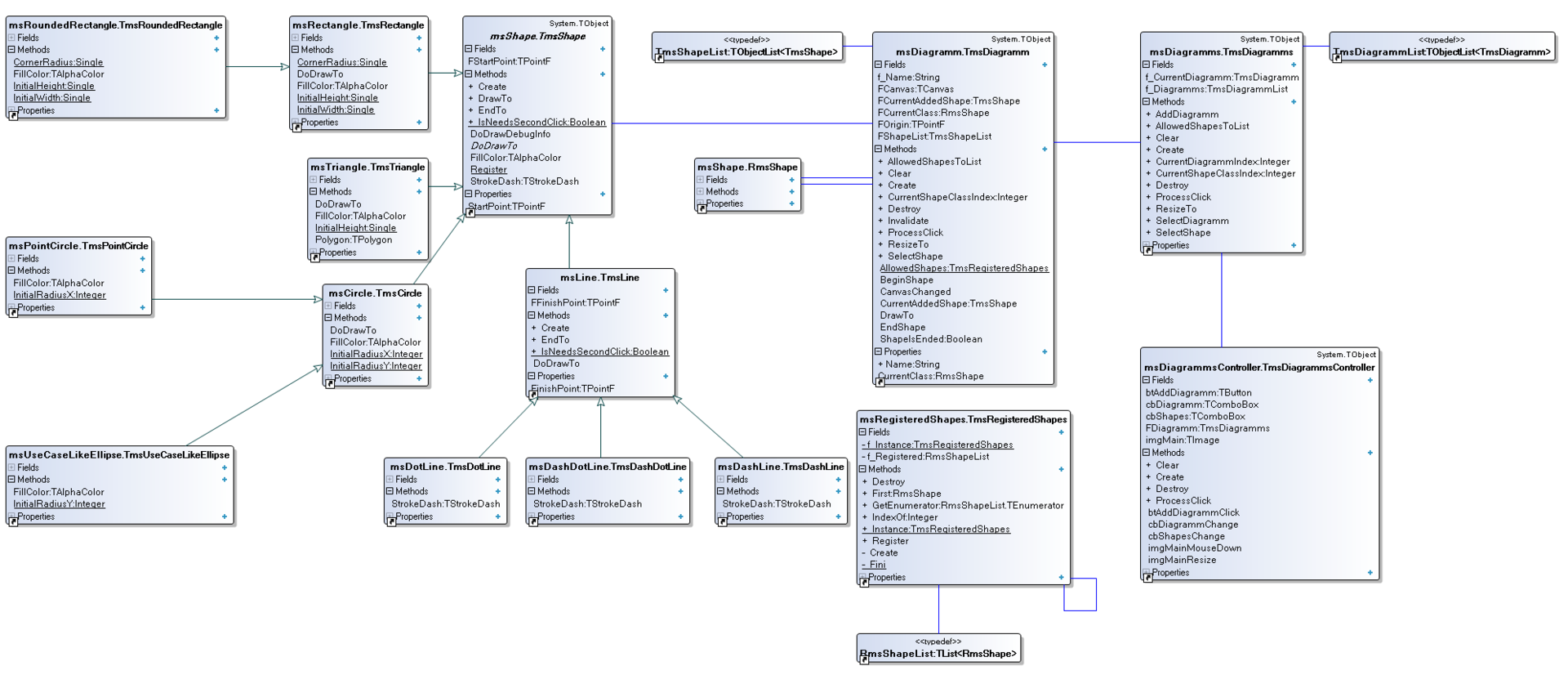
UML class diagram:
So well, in the article we’ve shown how to get rid of code duplication step-by-step by using inheritance and virtual functions. We’ve given an example of Dependency Injection, which made our life greatly easier. Otherwise we would constantly see unarticulated “case of” and “Object is”. We have demonstrated, step by step, how to avoid writing code inside event handler – that is by creating specific class-controller, which takes all the responsibility. We’ve also shown how not to make “Swiss knives” of a class, by dividing each layer according to the responsibilities. TmsDiagramm is responsible for drawing. TmsDiagramms is responsible for the list of diagrams, and besides it accounts for the co-ordination of the whole work of each diagram with the main computer. Finally, the class TmsDiagrammsController is a connecting link between a user and the diagrams.

BitBucket repository

воскресенье, 23 ноября 2014 г.

Link. Firemonkey + DUnit

"In this post, I want to describe the process of transferring VCL code to FireMonkey. As far as I remember DUnit was a part of Delphi since Delphi 2009.
It has been written in the early days of VCL and although it allows you to test code written for FireMonkey (thanks to the console output), it does not have GUIRunner, to which many of us are accustomed to, because it's very fast and easy, for instance, to disable those tests that we do not want to run..."

Firemonkey + DUnit