Сегодня поговорим о тестировании.
MindStream. Часть 5. Тестирование
MindStream. Часть 5. Тестирование
  l_Test.GUIObject := aNode.Items[l_Index];
  ...
  l_TreeViewItem.Tag := FTests.Add(aTest);
DUnitX developer did in almost the same way. However, he made a wrapper on TTreeViewItem (I will adopt it in the future):
type
  TTestNode = class(TTreeViewItem)
  strict private
    FFullName: String;
    FImage: TImage;
  public
    constructor Create(Owner: TComponent; Text: String; TestFullName: String); reintroduce;
    destructor Destroy; override;
    property FullName: String read FFullName;
    procedure SetResultType(resultType: TTestResultType);
    procedure Reload;
  end;
I connected each test with a branch named after the test.
function TGUIXTestRunner.GetNode(FullName: String): TTreeViewItem;
var
  i: Integer;
begin
  Result := nil;
  i := 0;
  repeat begin
    if (TestTree.ItemByGlobalIndex(i) as TTestNode).FullName = FullName then
      Result := TestTree.ItemByGlobalIndex(i);
    Inc(i);
   end
   until Assigned(Result) or (i >= TestTree.GlobalCount);
end;
What surprised me is the following issue:
FFailedTests: TDictionary<string>;Try to guess why do we need key String? That’s right – so that with a help of it we could get to the branch and report on its state after having finished the test. As for me, we’ve overcomplicated things. Class TTreeNode is worth special mentioning. It stores a “link” to the test and a picture that will change the state of the branch. Since this class is inherited from TreeViewItem, this code works successfully:
var
   testNode : TTreeViewItem;
   ...
   testNode := CreateNode(TestTree, test.Name, test.Fixture.FullName + '.' + test.Name);
   ...

function TGUIXTestRunner.CreateNode(Owner: TComponent; Text: String; TestFullName: String): TTreeViewItem;
begin
  Result := TTestNode.Create(Owner, Text, TestFullName);
end;
...
constructor TTestNode.Create(Owner: TComponent; Text, TestFullName: String);
begin
  inherited Create(Owner);
  Self.Text := Text;
  FFullName := TestFullName;
  FImage := TImage.Create(Owner);
  FImage.Parent := Self;
  {$IFDEF DELPHI_XE6_UP}
  FImage.Align := TAlignLayout.Right;
  {$ELSE}
  FImage.Align := TAlignLayout.alRight;
  {$ENDIF}
  FImage.Bitmap.Create(15, 15);
  FImage.Bitmap.Clear(TAlphaColorRec.Gray);
  FImage.SendToBack;
end;
In general, DUnitX made a positive impression on me. The framework seems to be far more trust-worthy than its “big brother”. The developers reconsidered and in a way improwed the interface and the architecture. The whole code looks really neat. There are much more commentaries there. I will examine and compare.function TmsTriangleDirectionRight.Polygon: TPolygon;
begin
SetLength(Result, 4);
Result[0] := TPointF.Create(StartPoint.X - InitialHeight / 2,
StartPoint.Y - InitialHeight / 2);
Result[1] := TPointF.Create(StartPoint.X - InitialHeight / 2,
StartPoint.Y + InitialHeight / 2);
Result[2] := TPointF.Create(StartPoint.X + InitialHeight / 2,
StartPoint.Y);
Result[3] := Result[0];
end;
That is how our triangles look like: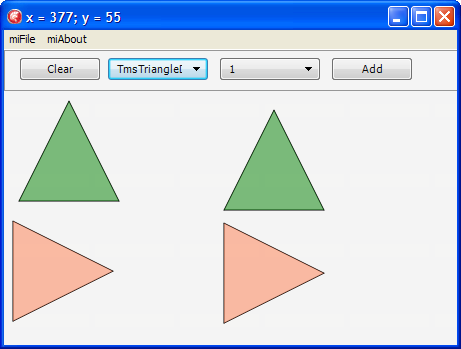
type
  TmsSmallTriangle = class(TmsTriangleDirectionRight)
  protected
    function FillColor: TAlphaColor; override;
  public
    class function InitialHeight: Single; override;
  end; // TmsSmallTriangle
As you can see, all we have done is overridden functions that are unique for the new triangle.
Next, we’ll add a class of an arrowed line inherited from an ordinary line. Only the procedure of drawing the primitive will be overridden in the class, in other words, the line will be drawn by a base class and the triangle is an heir.
procedure TmsLineWithArrow.DoDrawTo(const aCtx: TmsDrawContext);
var
  l_Proxy : TmsShape;
  l_OriginalMatrix: TMatrix;
  l_Matrix: TMatrix;
  l_Angle : Single;
  l_CenterPoint : TPointF;

  l_TextRect : TRectF;
begin
  inherited;
  if (StartPoint <> FinishPoint) then
  begin
    l_OriginalMatrix := aCtx.rCanvas.Matrix;
    try
    l_Proxy := TmsSmallTriangle.Create(FinishPoint);
      try
        // Just yet in order to experiment we specify rotation by 0 degrees
        // to ensure the triangle is drawn correctly
        l_Angle := DegToRad(0);

        l_CenterPoint := TPointF.Create(FinishPoint.X , FinishPoint.Y);

        // We’ve stored the initial matrix
        l_Matrix := l_OriginalMatrix;
        // We’ve transferred the origin of coordinates in the point where a rotation will be made
        l_Matrix := l_Matrix * TMatrix.CreateTranslation(-l_CenterPoint.X, -l_CenterPoint.Y);
        // The process itself
        l_Matrix := l_Matrix * TMatrix.CreateRotation(l_Angle);
        // We’ve put back the origin of the coordinates
        l_Matrix := l_Matrix * TMatrix.CreateTranslation(l_CenterPoint.X, l_CenterPoint.Y);

        // We are applying our space matrix to the canvas
        aCanvas.SetMatrix(l_Matrix);

        // We’re drawing :)
        l_Proxy.DrawTo(aCanvas, aOrigin);
      finally
        FreeAndNil(l_Proxy);
      end; // try..finally
    finally
      // Since we’ve drawn the required figure we put back the initial matrix to the canvas
      aCanvas.SetMatrix(l_OriginalMatrix);
    end;
  end;//(StartPoint <> FinishPoint)
end;
There is nothing much to explain, everything is already given in the commentaries. Anyway, if you wish to recollect what vector algebra is and how to work with vector graphic (moving, figures rotation and so on) I recommend a remarkable post on Habr on this subject as well as articles here and here. As shown in the picture, our triangle is now drawn only if we draw a line from left to right: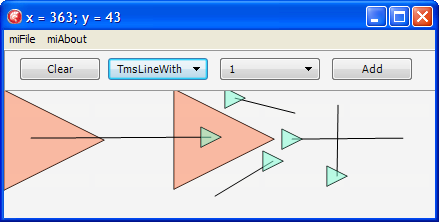
function TmsLineWithArrow.GetArrowAngleRotation: Single;
var
  l_ALength, l_CLength, l_AlphaAngle, l_X, l_Y, l_RotationAngle: Single;
  l_PointC: TPointF;
  l_Invert: SmallInt;
begin
  Result := 0;

  // The formula for calculating the distance between two points
  l_X := (FinishPoint.X - StartPoint.X) * (FinishPoint.X - StartPoint.X);
  l_Y := (FinishPoint.Y - StartPoint.Y) * (FinishPoint.Y - StartPoint.Y);

  // We find the length of the hypotenuse of the right-angled triangle
  l_CLength := sqrt(l_X + l_Y);

  l_PointC := TPointF.Create(FinishPoint.X, StartPoint.Y);

  // The formula for calculating the distance between two points
  l_X := (l_PointC.X - StartPoint.X) * (l_PointC.X - StartPoint.X);
  l_Y := (l_PointC.Y - StartPoint.Y) * (l_PointC.Y - StartPoint.Y);

  // We find the length of the leg
  l_ALength := sqrt(l_X + l_Y);

  // The angle in radians
  l_AlphaAngle := ArcSin(l_ALength / l_CLength);

  l_RotationAngle := 0;
  l_Invert := 1;

  if FinishPoint.X > StartPoint.X then
  begin
    l_RotationAngle := Pi / 2 * 3;
    if FinishPoint.Y > StartPoint.Y then
      l_Invert := -1;
  end
  else
  begin
    l_RotationAngle := Pi / 2;
    if FinishPoint.Y < StartPoint.Y then
      l_Invert := -1;
  end;

  Result := l_Invert * (l_AlphaAngle + l_RotationAngle);
end;
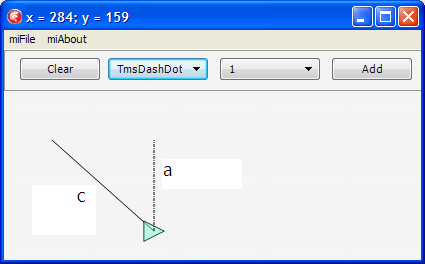
Now our line looks like this:
var
  l_Finish : TPointF;
  l_Rect: TRectF;
begin
  Result := False;
  l_Finish := TPointF.Create(StartPoint.X + InitialWidth,
                             StartPoint.Y + InitialHeight);
  l_Rect := TRectF.Create(StartPoint,l_Finish);
  Result := l_Rect.Contains(aPoint);
end;
2. This method is used to detect which figure we’ve got to:
class function TmsShape.ShapeByPt(const aPoint: TPointF; aList: TmsShapeList): TmsShape;
var
  l_Shape: TmsShape;
  l_Index: Integer;
begin
  Result := nil;
  for l_Index := aList.Count - 1 downto 0 do
  begin
    l_Shape := aList.Items[l_Index];
    if l_Shape.ContainsPt(aPoint) then
    begin
      Result := l_Shape;
      Exit;
    end; // l_Shape.ContainsPt(aPoint)
  end; // for l_Index
end;
3. On the first click in the figure that we’ve got to we have to change its outline or a number of other characteristics.
To implement this method we’ll perform a slight refactoring. We introduce a so-called “drawing context”:
type
  TmsDrawContext = record
  public
    rCanvas: TCanvas;
    rOrigin: TPointF;
    rMoving: Boolean; // We define that the currently drawn primitive is moving
    constructor Create(const aCanvas: TCanvas; const aOrigin: TPointF);
  end; // TmsDrawContext
If we specify the figure as “movable” in the drawing context, the drawing will be performed in the different way.
procedure TmsShape.DrawTo(const aCtx: TmsDrawContext);
begin
  aCtx.rCanvas.Fill.Color := FillColor;
  if aCtx.rMoving then
  begin
    aCtx.rCanvas.Stroke.Dash := TStrokeDash.sdDashDot;
    aCtx.rCanvas.Stroke.Color := TAlphaColors.Darkmagenta;
    aCtx.rCanvas.Stroke.Thickness := 4;
  end
  else
  begin
    aCtx.rCanvas.Stroke.Dash := StrokeDash;
    aCtx.rCanvas.Stroke.Color := StrokeColor;
    aCtx.rCanvas.Stroke.Thickness := StrokeThickness;
  end;
  DoDrawTo(aCtx);
end;
4. On the second click we have to move the figure to which we’ve got.
To begin with, let’s introduce a factory method responsible for figure constructing (the list of the figures is required so that TmsMover could call all the figures drawn within the current diagram).
class function TmsShape.Make(const aStartPoint: TPointF; aListWithOtherShapes: TmsShapeList): TmsShape;
begin
  Result := Create(aStartPoint);
end;
...
class function TmsMover.Make(const aStartPoint: TPointF;
                                   aListWithOtherShapes: TmsShapeList): TmsShape;
var
  l_Moving: TmsShape;
begin
  l_Moving := ShapeByPt(aStartPoint, aListWithOtherShapes);
  if (l_Moving <> nil) then
    Result := Create(aStartPoint, aListWithOtherShapes, l_Moving)
  else
    Result := nil;
end;
As a result of using class function we’ve fundamentally separated creating of the moved object and of the other figures. However, this approach has a disadvantage. For instance, we introduced a parameter of creating aListWithOtherShapes which is not required for the other figures at all.
type
  TmsMover = class(TmsShape)
  private
    f_Moving: TmsShape;
    f_ListWithOtherShapes: TmsShapeList;
  protected
    procedure DoDrawTo(const aCtx: TmsDrawContext); override;
    constructor Create(const aStartPoint: TPointF; aListWithOtherShapes: TmsShapeList; aMoving: TmsShape);
  public
    class function Make(const aStartPoint: TPointF; aListWithOtherShapes: TmsShapeList): TmsShape; override;
    class function IsNeedsSecondClick: Boolean; override;
    procedure EndTo(const aFinishPoint: TPointF); override;
  end; // TmsMover

implementation

uses
  msRectangle,
  FMX.Types,
  System.SysUtils;

constructor TmsMover.Create(const aStartPoint: TPointF; aListWithOtherShapes: TmsShapeList; aMoving: TmsShape);
begin
  inherited Create(aStartPoint);
  f_ListWithOtherShapes := aListWithOtherShapes;
  f_Moving := aMoving;
end;

class function TmsMover.Make(const aStartPoint: TPointF;
                                   aListWithOtherShapes: TmsShapeList): TmsShape;
var
  l_Moving: TmsShape;
begin
  l_Moving := ShapeByPt(aStartPoint, aListWithOtherShapes);
  if (l_Moving <> nil) then
    Result := Create(aStartPoint, aListWithOtherShapes, l_Moving)
  else
    Result := nil;
end;

class function TmsMover.IsNeedsSecondClick: Boolean;
begin
  Result := true;
end;

procedure TmsMover.EndTo(const aFinishPoint: TPointF);
begin
  if (f_Moving <> nil) then
    f_Moving.MoveTo(aFinishPoint);
  f_ListWithOtherShapes.Remove(Self);
  // Now I must delete MYSELF since we do not need mover in the general list after it has performed its function
end;

procedure TmsMover.DoDrawTo(const aCtx: TmsDrawContext);
var
  l_Ctx: TmsDrawContext;
begin
  if (f_Moving <> nil) then
  begin
    l_Ctx := aCtx;
    l_Ctx.rMoving := true;
    f_Moving.DrawTo(l_Ctx);
  end; // f_Moving <> nil
end;

initialization

TmsMover.Register;

end.
In the controller we just have to change methods of figures creating:
procedure TmsDiagramm.BeginShape(const aStart: TPointF);
begin
  Assert(CurrentClass <> nil);
  FCurrentAddedShape := CurrentClass.Make(aStart, FShapeList);
  if (FCurrentAddedShape <> nil) then
  begin
    FShapeList.Add(FCurrentAddedShape);
    if not FCurrentAddedShape.IsNeedsSecondClick then
      FCurrentAddedShape := nil;
    Invalidate;
  end; // FCurrentAddedShape <> nil
end;

procedure TmsDiagramm.EndShape(const aFinish: TPointF);
begin
  Assert(CurrentAddedShape <> nil);
  CurrentAddedShape.EndTo(aFinish);
  FCurrentAddedShape := nil;
  Invalidate;
end;
In case of mover a call CurrentAddedShape.EndTo(aFinish) calls another one - MoveTo, i.e. moves the figure, and the redrawing, as shown above, is initiated by the controller:
procedure TmsMover.EndTo(const aFinishPoint: TPointF);
begin
  if (f_Moving <> nil) then
    f_Moving.MoveTo(aFinishPoint);
  f_ListWithOtherShapes.Remove(Self);
  // Now I must delete MYSELF since we do not need mover in the general list after it has performed its function
end;

...

procedure TmsShape.MoveTo(const aFinishPoint: TPointF);
begin
  FStartPoint := aFinishPoint;
end;
Since the controller is responsible for figures behavior, we’ll take the method of checking the “getting to a figure” away to the controller, and while creating the objects we’ll pass a check function:
type
  TmsShapeByPt = function (const aPoint: TPointF): TmsShape of object;
...
class function Make(const aStartPoint: TPointF; aShapeByPt: TmsShapeByPt): TmsShape; override;
...
procedure TmsDiagramm.BeginShape(const aStart: TPointF);
begin
 Assert(CurrentClass <> nil);
 // The call itself
 FCurrentAddedShape := CurrentClass.Make(aStart, Self.ShapeByPt);
 if (FCurrentAddedShape <> nil) then
 begin
  FShapeList.Add(FCurrentAddedShape);
  if not FCurrentAddedShape.IsNeedsSecondClick then
   FCurrentAddedShape := nil;
  Invalidate;
 end;//FCurrentAddedShape <> nil
end;
Since we have to pass two parameters in order to create objects, we define a context of “creating”:
type
  TmsMakeShapeContext = record
  public
    rStartPoint: TPointF;
    rShapeByPt: TmsShapeByPt;
    constructor Create(aStartPoint: TPointF; aShapeByPt: TmsShapeByPt);
  end;//TmsMakeShapeContext
Let’s add interfaces implemented by the controller and also a class of interface object. In the future we’ll realise our own reference counting in it.
type
  TmsInterfacedNonRefcounted = class abstract(TObject)
  protected
    function QueryInterface(const IID: TGUID; out Obj): HResult; stdcall;
    function _AddRef: Integer; stdcall;
    function _Release: Integer; stdcall;
  end;//TmsInterfacedNonRefcounted

  TmsShape = class;

  ImsShapeByPt = interface
    function ShapeByPt(const aPoint: TPointF): TmsShape;
  end;//ImsShapeByPt

  ImsShapesController = interface
    procedure RemoveShape(aShape: TmsShape);
  end;//ImsShapeRemover
Let’s slightly change TmsMakeShapeContext:
type
  TmsMakeShapeContext = record
  public
    rStartPoint: TPointF;
    rShapesController: ImsShapesController;
    constructor Create(aStartPoint: TPointF; const aShapesController: ImsShapesController);
  end; // TmsMakeShapeContext
I recommend two interesting posts on interfaces and details of working with them in Delphi: 18delphi.blogspot.com/2013/04/iunknown.html and habrahabr.ru/post/181107/ FCurrentAddedShape := CurrentClass.Make(aStart, Self.ShapeByPt);And it became like this:
FCurrentAddedShape := CurrentClass.Make(TmsMakeShapeContext.Create(aStart, Self));In case of moving, EndTo method will look as follows:
procedure TmsMover.EndTo(const aCtx: TmsEndShapeContext);
begin
  if (f_Moving <> nil) then
    f_Moving.MoveTo(aCtx.rStartPoint);
  f_Moving := nil;
  aCtx.rShapesController.RemoveShape(Self);
  // Now I must delete MYSELF
end;
In the previous post I’ve told about hiding of “unique configurations” (filling color, line width, etc.) in virtual methods that each figure defines independently. For example:
function TmsTriangle.FillColor: TAlphaColor;
begin
 Result := TAlphaColorRec.Green;
end;
We pack all figures configurations in the context:
type
  TmsDrawOptionsContext = record
  public
    rFillColor: TAlphaColor;
    rStrokeDash: TStrokeDash;
    rStrokeColor: TAlphaColor;
    rStrokeThickness: Single;
    constructor Create(const aCtx: TmsDrawContext);
  end;//TmsDrawOptionsContext
In TmsShape class we make a virtual procedure similarly to the previous example. In the future we’ll easily expand the number of unique figure configurations:
procedure TmsTriangle.TransformDrawOptionsContext(var theCtx: TmsDrawOptionsContext);
begin
  inherited;
  theCtx.rFillColor := TAlphaColorRec.Green;
  theCtx.rStrokeColor := TAlphaColorRec.Blue;
end;
Using the context we put the logic (do we really draw a mover?) away from the method of drawing and hide it in the record constructor:
constructor TmsDrawOptionsContext.Create(const aCtx: TmsDrawContext);
begin
  rFillColor := TAlphaColorRec.Null;
  if aCtx.rMoving then
  begin
    rStrokeDash := TStrokeDash.sdDashDot;
    rStrokeColor := TAlphaColors.Darkmagenta;
    rStrokeThickness := 4;
  end // aCtx.rMoving
  else
  begin
    rStrokeDash := TStrokeDash.sdSolid;
    rStrokeColor := TAlphaColorRec.Black;
    rStrokeThickness := 1;
  end; // aCtx.rMoving
end;
After that our method of drawing becomes like this:
procedure TmsShape.DrawTo(const aCtx: TmsDrawContext);
var
  l_Ctx: TmsDrawOptionsContext;
begin
  l_Ctx := DrawOptionsContext(aCtx);
  aCtx.rCanvas.Fill.Color := l_Ctx.rFillColor;
  aCtx.rCanvas.Stroke.Dash := l_Ctx.rStrokeDash;
  aCtx.rCanvas.Stroke.Color := l_Ctx.rStrokeColor;
  aCtx.rCanvas.Stroke.Thickness := l_Ctx.rStrokeThickness;
  DoDrawTo(aCtx);
end;

function TmsShape.DrawOptionsContext(const aCtx: TmsDrawContext): TmsDrawOptionsContext;
begin
  Result := TmsDrawOptionsContext.Create(aCtx);
  // We get the configurations for each figure
  TransformDrawOptionsContext(Result);
end;
The only thing left to make our figures movable is to code for each figure ContainsPt method responsible for checking if a point gets to a figure. This is a routine trigonometry; all the formulas can be found on the Internet.


unit msOurShapes;

interface
uses
  msLine,
  msRectangle,
  msCircle,
  msRoundedRectangle,
  msUseCaseLikeEllipse,
  msTriangle,
  msDashDotLine,
  msDashLine,
  msDotLine,
  msLineWithArrow,
  msTriangleDirectionRight,
  msMover,
  msRegisteredShapes
  ;
implementation

procedure RegisterOurShapes;
begin
  TmsRegisteredShapes.Instance.Register([
    TmsLine,
    TmsRectangle,
    TmsCircle,
    TmsRoundedRectangle,
    TmsUseCaseLikeEllipse,
    TmsTriangle,
    TmsDashDotLine,
    TmsDashLine,
    TmsDotLine,
    TmsLineWithArrow,
    TmsTriangleDirectionRight,
    TmsMover
   ]);
end;

initialization
 RegisterOurShapes;

end.
Let’s add registration method in the container:
procedure TmsRegisteredShapes.Register(const aShapes: array of RmsShape);
var
  l_Index: Integer;
begin
  for l_Index := Low(aShapes) to High(aShapes) do
    Self.Register(aShapes[l_Index]);
end;

procedure TmsRegisteredShapes.Register(const aValue: RmsShape);
begin
  Assert(f_Registered.IndexOf(aValue) < 0);
  f_Registered.Add(aValue);
end;

